Dreamy Room Level 578
Dreamy Room Level 578 guide - Dreamy Room 578 Walkthrough & Solution.
Important Notice Regarding Level Numbering
Due to frequent changes in Dreamy Room's level numbering and differences between platforms (Android/iOS) – for example, level 578 on Android might not be the same as level 578 on iOS – the text guide below may not always match the images and video above. Please prioritize the image and video guides. If you find that the guide content doesn't match your current level, please visit the All Level Walkthroughs page to find the correct guide based on level images. Thank you for your understanding.
Dreamy Room Level 578 Walkthroughs & Guide
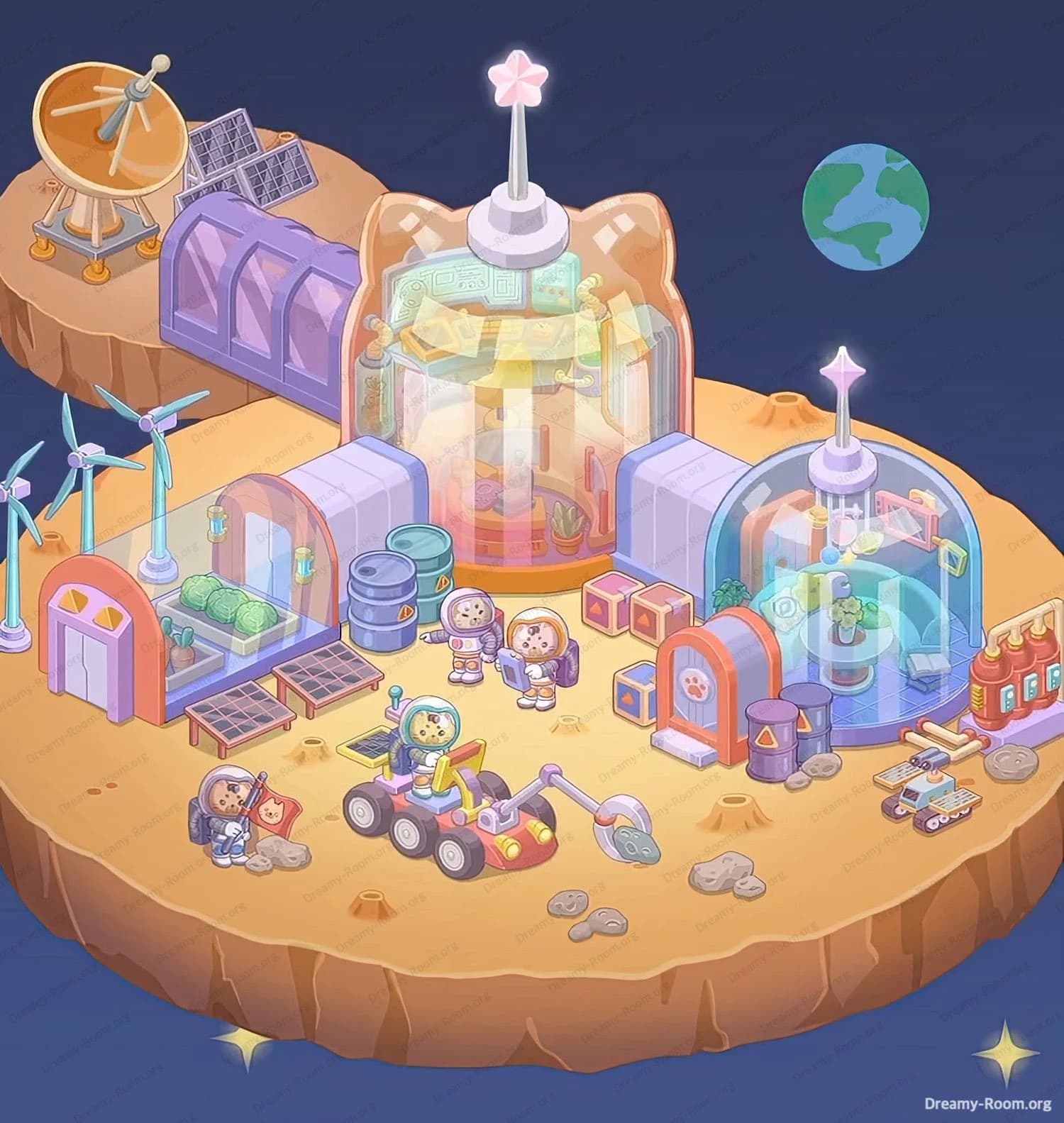
In Dreamy Room Level 578, your goal is to turn a bare pair of floating rocks into a fully functioning space colony, filled with domes, astronauts, vehicles, and equipment. Every item has a precise home, and the main challenge of Dreamy Room Level 578 is working out the correct placement of each object so that the whole base feels logical and balanced.
Step 1. Place the main cat-shaped command dome on the central platform
Start Dreamy Room Level 578 by transforming the orange cat-ear platform on the main asteroid into the command hub. Drag the tall cat-shaped glass dome with the white base and star antenna and snap it exactly onto the purple floor of the cat platform. The dome should sit slightly toward the back of the main rock, leaving space in front for vehicles and astronauts. Inside this dome you’ll see the control room: a curved console full of green screens at the top, hanging robotic arms at the sides, and equipment plus a plant along the back wall. When the dome is correctly placed in Dreamy Room Level 578, its white antenna points straight up into the sky and the orange base fully covers the cat platform outline.
Step 2. Place the right habitat dome on the smaller round base
Next, set up the living area for Dreamy Room Level 578. Drag the smaller blue-tinted glass dome with the purple base and white star antenna onto the circular platform on the right side of the main asteroid. Align it so the front opening faces left toward the command dome, because a tunnel will connect them later. Inside this habitat you should clearly see a turquoise curved sofa wrapping around the back, a round table with a potted plant in the center, a small cushion with an open book on the right, and hanging planet-shaped lights plus picture frames on the back wall. If the dome is offset, the floor grid won’t match the platform; adjust until the purple floor fits exactly inside the base ring for Dreamy Room Level 578.
Step 3. Connect the domes with the side corridor and add crates
Now link the two domes so the colony in Dreamy Room Level 578 feels like one continuous base. Take the light purple rectangular tunnel piece and place it between the command dome and the right habitat dome, slightly behind the center line. Its rounded ends should fit neatly into the openings of both domes, forming a smooth bridge. Then place the stack of orange and blue cargo crates in front of the tunnel, slightly to the right of the command dome door and just left of the habitat dome’s orange paw-print door. Arrange the three orange crates in a staggered pile and tuck one blue crate at the bottom left. This cluster of crates helps visually anchor the connection between buildings and is essential for matching the final layout of Dreamy Room Level 578.
Step 4. Add the greenhouse tunnel and barrels on the left side
Shift focus to the left side of the command dome to build the farming area of Dreamy Room Level 578. First, drag the second light purple tunnel to attach to the left side of the cat-shaped dome, mirroring the right-side connector. In front of this connector, place the rectangular greenhouse with the orange frame and rounded glass roof so that its transparent side faces the bottom edge of the asteroid. Inside the greenhouse you should see three large green cabbages and two orange carrot-like plants, plus two hanging grow lamps near the back. Just behind and slightly right of this greenhouse, place the stack of blue metal barrels—two stacked with one taller barrel beside them. Make sure the barrels sit close to the left tunnel’s end. When placed correctly in Dreamy Room Level 578, this whole cluster forms a compact agricultural zone.
Step 5. Position the entrance building, warning barrels, and small bush
To finish the central corridor area of Dreamy Room Level 578, place the orange-and-blue entrance building with the paw-print symbol right in front of the connector to the right habitat dome. Its rounded top should lean toward the right, and the light step at its base should sit on the ground, not floating. Immediately in front and slightly to the right of this entrance, arrange the two purple hazard barrels with yellow triangles. One barrel stands slightly behind the other, with a couple of grey rocks at their base. Behind the entrance building, tuck the small green bush so just its leaves peek out from the left edge. This composition makes the right side look busy and industrial, which is a key visual cue for Dreamy Room Level 578.
Step 6. Build the energy farm with wind turbines and solar panels
On the left front edge of the main asteroid in Dreamy Room Level 578, create the renewable-energy field. Place the three slim turquoise wind turbines in a diagonal line along the left rim, all facing right toward the domes. Their round bases should sit evenly on the ground, and the blades should spin free above the greenhouse roof. In front of the greenhouse, arrange the two rectangular solar panel tables so they sit side by side, their dark grids tilted slightly upward toward the player. Ensure they touch the greenhouse base but do not overlap. Behind the greenhouse door, the small orange entrance frame should align with the turbines, forming a clean visual line. When correctly positioned in Dreamy Room Level 578, this area clearly reads as the colony’s power sector.
Step 7. Set up the communication island with dish, tunnel, and solar arrays
Now move to the smaller floating rock at the upper left of Dreamy Room Level 578. Here you will create the communications outpost. First, place the large orange satellite dish on a sturdy tripod so it stands on the left side of the small rock, angled slightly toward the Earth in the background. Behind and to the right of the dish, position the two grey rectangular solar panels leaning backward, as if capturing sunlight. At the front edge of this smaller rock—overlapping slightly with the main asteroid—position the long purple building with three arched windows so it points toward the cat-shaped dome. The purple structure must sit parallel to the back of the main dome. Together, these objects make the upper-left island look like a dedicated communication and power relay in Dreamy Room Level 578.
Step 8. Place the astronauts and rover on the front work area
The heart of the action in Dreamy Room Level 578 is the busy front work zone. Start by placing the four-wheeled red and yellow rover toward the lower middle of the main asteroid. Its cabin with a cat astronaut should face left, and the long mechanical arm with the circular rock saw must extend toward a cluster of grey rocks. Position those rocks just in front of the arm’s cutting head. To the left of the rover, place an astronaut kneeling beside another rock pile, holding a red flag with a cat face emblem. Slightly behind the rover and closer to the center, place two standing astronauts side by side—one pointing forward, the other holding a tablet or clipboard. They should face the viewer, directly in front of the command dome. This arrangement conveys an organized mining and exploration team for Dreamy Room Level 578.
Step 9. Arrange right-side supplies, mini-vehicle, and fuel bottles
Finally, complete the right flank of Dreamy Room Level 578 with tools and supplies. To the far right of the habitat dome, place the rack of three tall red-orange bottles with yellow caps; these look like fuel or chemical canisters. Directly in front of them, arrange the wooden workbench covered with pale planks and metal pipes, oriented horizontally. In front of the bench, on the lower right edge of the asteroid, park the small blue and beige utility rover with its flat cargo bed and purple wheels, aimed slightly toward the center. Sprinkle the remaining small rocks around this area and near the central craters so the ground looks naturally uneven. When these final pieces are correctly placed in Dreamy Room Level 578, the whole base feels stocked, functional, and ready for long-term space living.
Notes and Precautions
In Dreamy Room Level 578, many objects look similar in size or colour, so it’s easy to misplace them if you rush. Pay special attention to which tunnel piece belongs on which side; both connectors share the same palette, but their orientation relative to the domes is fixed. The crates must sit between the two domes, not near the greenhouse, and the hazard barrels always belong near the paw-print entrance, never by the farming area. When placing astronauts, avoid covering important ground details like craters, since the game sometimes treats these as reference points for correct placement. The satellite dish, solar panels, and purple building all belong entirely on the upper-left rock; if any part sits fully on the main asteroid, Dreamy Room Level 578 may mark them as incorrect. Zoom in frequently to ensure edges align cleanly with platform outlines.
Tips and Tricks from top player
Top players of Dreamy Room Level 578 recommend starting with the largest, most central structures—the two domes and their tunnels—before touching smaller props. Once those anchors are locked in, it becomes much easier to judge where support items should go, because almost everything either connects to a dome or lines up with it. Another strong tactic is to group items by “theme”: power items (turbines, solar panels, satellite dish) to the left and top; farming items (greenhouse and cabbages) around the left tunnel; living and logistics items (entrance building, habitat dome, couches, plant, book) to the right; and exploration gear (rovers, astronauts, rocks) in the front. If you ever feel stuck in Dreamy Room Level 578, switch to a mental checklist—domes, connectors, energy, farming, storage, crew, vehicles, then background details like the Earth—so you can quickly see what’s missing.
Final scene overview
When everything is placed correctly, Dreamy Room Level 578 becomes a charming miniature lunar-style colony on two floating rocks. The big asteroid holds a cat-shaped command dome in the center, linked by soft purple tunnels to the left greenhouse and the right cozy habitat. Wind turbines spin beside tidy solar panels, while blue barrels, orange crates, hazard drums, and a paw-print entrance door make the base look busy and lived-in. Three little astronauts and two rovers work among scattered rocks at the front, actively mining and exploring. On the smaller rock, the huge satellite dish and extra solar arrays keep the colony in touch with space, while Earth hangs peacefully in the dark sky above. Completed, Dreamy Room Level 578 feels like a fully self-sufficient, adorable space outpost.