Dreamy Room Level 522
Dreamy Room Level 522 guide - Dreamy Room 522 Walkthrough & Solution.
Important Notice Regarding Level Numbering
Due to frequent changes in Dreamy Room's level numbering and differences between platforms (Android/iOS) – for example, level 522 on Android might not be the same as level 522 on iOS – the text guide below may not always match the images and video above. Please prioritize the image and video guides. If you find that the guide content doesn't match your current level, please visit the All Level Walkthroughs page to find the correct guide based on level images. Thank you for your understanding.
Dreamy Room Level 522 Walkthroughs & Guide
Step 1. Place the camera back, LCD frame, and viewfinder on the left wall
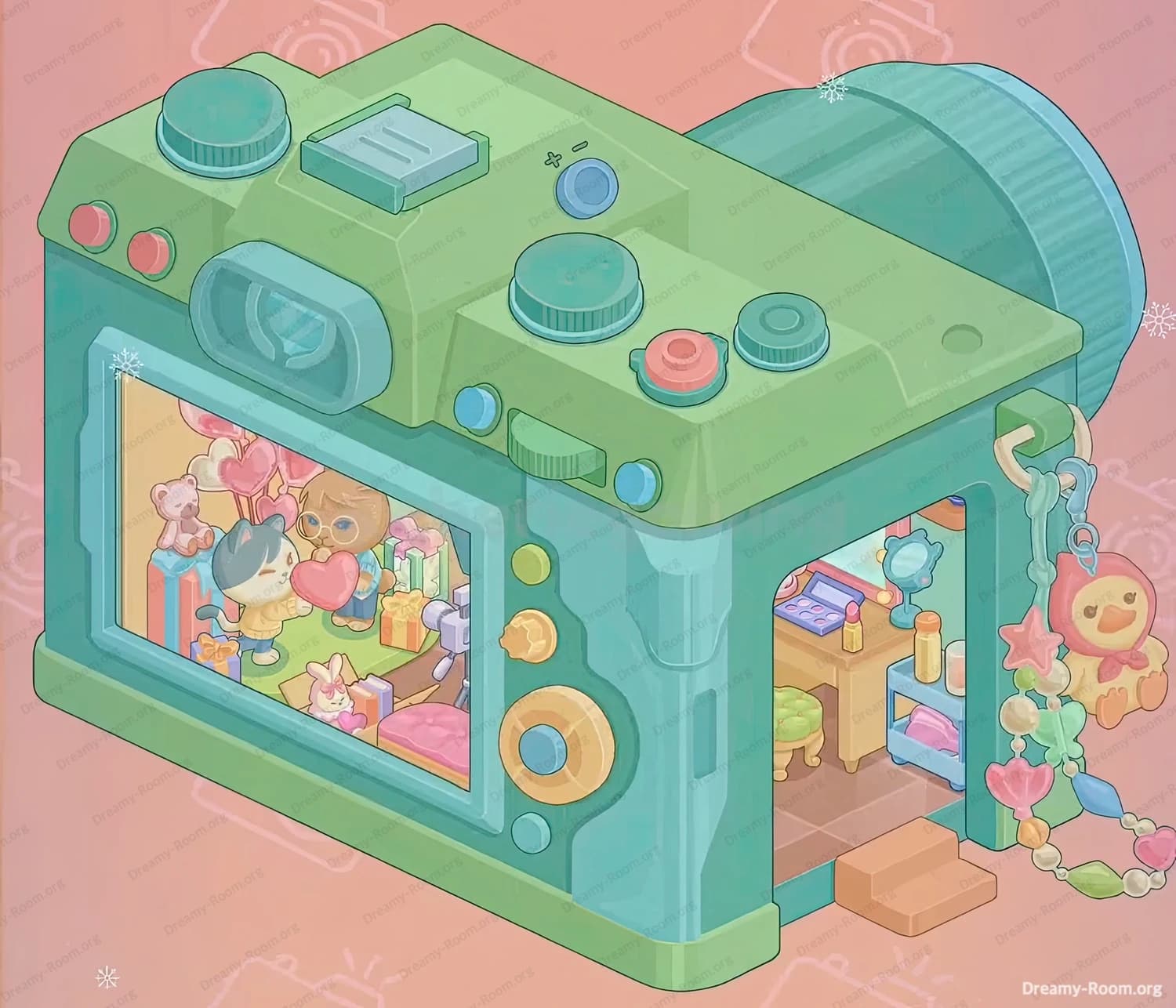
Begin Dreamy Room Level 522 by building the main camera body around the empty structure. Select the large teal camera back that contains the rectangular LCD cut-out and snap it to the outer side of the left wall, so that it covers the entire wall from top to bottom. The screen opening must align with the lower half of the wall, leaving space above it for the viewfinder block. Next, attach the rounded teal viewfinder housing so it sits centered above the LCD frame, slightly protruding outward. The lower edge of the viewfinder should just touch the top border of the screen frame, creating that classic camera rear layout. Make sure the outer bottom edge of the new camera shell lines up neatly with the front edge of the tiled floor; this alignment is crucial for all later pieces in Dreamy Room Level 522.
Step 2. Place the LCD picture and rear control buttons on the left side
Now decorate the back of the camera in Dreamy Room Level 522. Drag the colorful LCD picture into the empty frame on the left wall. The image must be perfectly centered: a cat-like character holding a pink heart should stand slightly left of center, facing a bear with glasses on the right. Behind them, arrange the background so that the cluster of pink heart balloons rises from the top left of the screen, while stacked gift boxes fill the lower corners. A white bunny holding a heart belongs near the bottom center, just in front of the presents, and a small grey camera on a tripod should point in from the right edge of the display. After the picture is locked, add the three circular control buttons to the right of the LCD: a small teal button at the top, a golden flower-shaped button in the middle, and a large golden dial with a teal center at the bottom. Correct spacing between these three controls is a common source of mistakes in Dreamy Room Level 522.
Step 3. Place the top plate, hot shoe, and upper dials of the camera
Next, complete the silhouette of the camera in Dreamy Room Level 522 by installing the light-green top plate. Position this long sloping piece so it sits flush on the top edges of both walls and connects seamlessly to the existing lens cylinder on the right. When the plate is aligned, place the large teal mode dial toward the back-left corner of the top, centered over the LCD area. In the middle of the slope, snap the rectangular light-blue hot-shoe slot so it runs front-to-back. To the right of the hot shoe, add the small blue on/off button symbol. On the right side of the top, align the second big teal dial close to the lens, and next to it place the smaller grey-rimmed wheel with a teal center. Just in front of these, set the coral-red shutter button so it pops forward. Every dial must sit fully on the flat areas of the top plate, otherwise Dreamy Room Level 522 will refuse to mark the step as complete.
Step 4. Add the colored top buttons and front-side accents
With the main dials done, decorate the rest of the exterior controls in Dreamy Room Level 522. On the slanted front-left edge of the top plate, place three small circular buttons in a row: red nearest the lens side, then pink, then green toward the left corner. Under the viewfinder on the back, you need two tiny circular buttons—teal on the left and yellow on the right—sitting just above a ridged green grip that runs horizontally. On the vertical turquoise side beneath that grip, place a small teal side button so it lines up with the middle of the screen. Finally, on the left edge of the camera body, position the large golden ring detail with a teal center, making sure it sits roughly opposite the lens. These finishing touches are easy to misalign, but in Dreamy Room Level 522 the subtle spacing around every button is part of the challenge.
Step 5. Build the interior vanity: desk, stool, shelf, and mirror
Now turn to the cozy room hidden inside the camera in Dreamy Room Level 522. Start with the wooden vanity desk and snap it along the back wall, running horizontally from just left of the doorway opening to the right wall. Its back edge should touch the tiled wall, while its front edge lines up with the middle of the floor depth. Under the left side of this desk, slide in the round green tufted stool so that only three of its short golden legs are visible from the doorway, with the cushion centered under the tabletop. On the right side, place the pale-blue two-tier shelf so that its top surface aligns with the desk’s height. Put the folded pink cushion or towel on the lower shelf, leaving the top shelf free for bottles. On the desktop, position the purple-and-blue makeup palette angled toward the doorway on the left, then a small pink lipstick in front of it, and a tall yellow bottle closer to the right. Finally, set the round stand mirror with a teal frame toward the right side of the desk, its reflective face tilted slightly toward the door. This compact arrangement is the heart of the tiny studio in Dreamy Room Level 522.
Step 6. Place the doorway, floor edge, and peach step outside the room
The entrance to the camera home is a key landmark in Dreamy Room Level 522. Ensure the rectangular doorway opening sits on the right wall, occupying about half the height of the wall, with its bottom edge exactly flush with the tiled floor. The turquoise inner frame of the doorway must follow the edge of the floor, forming a neat right angle at the front corner. Once the door frame is correct, drag the peach-colored block that functions as a two-tier step and attach it just outside the doorway on the front edge of the floor. The higher part of the step should tuck slightly under the door opening, while the lower part extends onto the pink ground outside the room. Check that the step aligns perfectly with the camera’s green base trim and does not slide left under the LCD side; misplacing this step is a common reason people get stuck on Dreamy Room Level 522.
Step 7. Hang the beaded keychain and mascot on the right side
To bring personality to Dreamy Room Level 522, you now need to attach the long beaded keychain. First, place the small beige hook bracket under the top plate at the front-right corner of the camera body, just above the doorway. Clip the teal metal ring into this bracket so it hangs downward. From the ring, attach the short section with a blue clasp, then let the pastel bead string fall in a gentle curve along the right edge of the camera. About midway down the chain, snap the large chick-like mascot wearing a pink hood so it hangs to the right of the doorway, facing slightly left toward the interior. Below it, continue the chain with alternating heart-shaped and round beads in pink, green, yellow, and blue until it nearly reaches the lower edge of the image. The chain should never cross the door opening; it must stay just outside the frame to match the final layout of Dreamy Room Level 522.
Step 8. Refine the lens cylinder and overall alignment
The big cylindrical lens is partly there from the start, but Dreamy Room Level 522 usually gives you at least one decorative ring to place. Position the lighter blue rim so it caps the front edge of the darker teal lens barrel on the right, with the grooves on the main barrel clearly visible behind it. Ensure the lens is centered horizontally relative to the camera top and that its base lines up with the right wall of the room. Double-check that the camera bottom trim—light green along the left and a matching strip along the right—sits exactly on the same plane as the tiled floor’s front edge. At this stage, zoom out and confirm that every feature you placed earlier forms a cohesive camera silhouette: smooth top plate, symmetric lens, straight rear LCD, and the doorway carved neatly into the right side. Once everything is aligned, the structural part of Dreamy Room Level 522 is complete and only minor nudges remain.
Notes and Precautions for Dreamy Room Level 522
Dreamy Room Level 522 is all about precision. Many pieces look similar in color—teal, mint, and light green dominate—so check shadows and outlines to distinguish parts before placing them. When working on the interior vanity, avoid pushing the desk or shelf too far forward; if their front edges cross the visible tile grid, later objects like the stool or bottles may refuse to snap. On the exterior, pay special attention to button order: the three tiny circles on the slanted left top must go red, pink, green from right to left, and swapping even two of them will block completion. The keychain in Dreamy Room Level 522 must be anchored to the small beige hook, not directly to the camera body. Finally, if the LCD picture looks slightly tilted or cropped, remove and re-place it; the game is surprisingly strict about that frame.
Tips and Tricks from top player for Dreamy Room Level 522
Experienced players approach Dreamy Room Level 522 from big shapes to small details. Start with any large body pieces and the doorway so that your mental grid of the room is fixed, then handle the vanity furniture, and only at the end place tiny cosmetics and beads. Working in this order reduces accidental overlaps that make items difficult to select later. Another top trick is to use color pairing as a guide: green pieces almost always belong to the camera shell or stool, while warm peach and pink pieces usually indicate “soft” objects like the step, gifts, or cushions. When aligning interior items in Dreamy Room Level 522, look at how their feet touch the tile seams; the stool’s four legs straddle a cross of grout lines, and the shelf’s front legs sit exactly one tile behind the doorway threshold. Last, if you’re unsure about the chain’s curve, let gravity guide you—imagine it dangling naturally and drop each bead segment in that gentle arc.
Final Look of Dreamy Room Level 522
When everything is correctly placed, Dreamy Room Level 522 shows a charming pastel camera that doubles as a miniature dressing studio. The mint-green body with teal accents wraps snugly around the original L-shaped room, crowned by smooth dials and colorful buttons. On the back, the LCD screen glows with a captured moment: two cute characters exchange a heart amid balloons, gifts, a bunny, and a recording camera, hinting at a celebration frozen in time. On the right, the doorway reveals the cozy interior—a wooden vanity lined with a makeup palette, lipstick, and golden bottles, a soft green stool tucked underneath, and a neat blue shelf holding a folded pink cushion. A peach step invites you up into the room, while a playful bead chain with a smiling mascot sways from the corner. The result is a snug, story-filled gadget home that perfectly captures the peaceful spirit of Dreamy Room Level 522.