Dreamy Room Level 670
Dreamy Room Level 670 guide - Dreamy Room 670 Walkthrough & Solution.
Important Notice Regarding Level Numbering
Due to frequent changes in Dreamy Room's level numbering and differences between platforms (Android/iOS) – for example, level 670 on Android might not be the same as level 670 on iOS – the text guide below may not always match the images and video above. Please prioritize the image and video guides. If you find that the guide content doesn't match your current level, please visit the All Level Walkthroughs page to find the correct guide based on level images. Thank you for your understanding.
Dreamy Room Level 670 Walkthroughs & Guide
Step 1. Place the main burger-shop building in the center-back of the grassy platform.
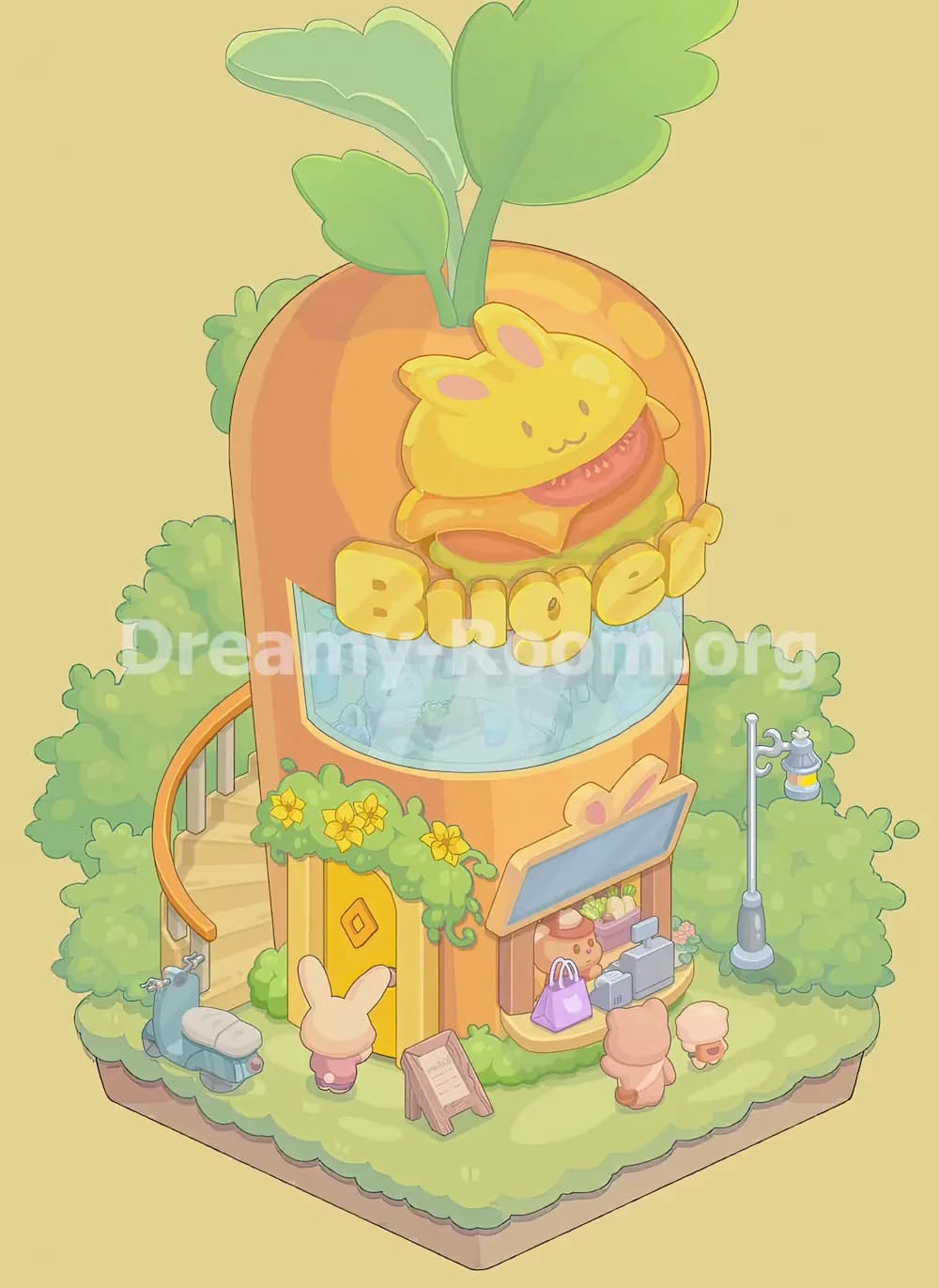
Begin Dreamy Room Level 670 by placing the large orange building slightly behind the center of the grassy base. This is the most important object because nearly every other item depends on its position. The building should stand tall against the leafy background, with its rounded top rising above the bushes. Make sure the front face points toward the lower-right side of the platform, while the yellow entrance sits on the lower-left front wall. In Dreamy Room Level 670, the building is not centered at the very front; it is pushed back enough to leave space for the scooter, characters, signboard, shop counter, and walking area. The orange structure should overlap the rear greenery naturally, making it look embedded into the garden.
Step 2. Add the giant green leaves on the roof of the burger shop.
Next in Dreamy Room Level 670, place the oversized green leaves at the very top of the rounded orange building. These leaves are one of the most visible decorations and should sprout upward from the roof like a playful plant crown. The tallest leaf should lean toward the upper-right side, while the smaller leaves spread toward the upper-left and center. Their stems should appear to emerge from behind the bunny-burger sign area, not from the ground. In Dreamy Room Level 670, this object is easy to misplace because the leaves are much larger than regular plants. Treat them as part of the building’s roof decoration rather than background foliage. Once placed correctly, they give the shop its vegetable-themed burger identity.
Step 3. Place the bunny burger mascot and large yellow “Buger” sign on the upper front.
For Dreamy Room Level 670, the upper-front sign is the visual centerpiece. Place the cute yellow bunny burger mascot near the top front of the building, directly above the blue curved window. The mascot should sit over a layered burger with tomato, cheese, patty, and lettuce visible beneath the bunny face. Under it, place the big yellow bubble letters spelling “Buger” across the front of the building. The letters should overlap the upper edge of the blue window and stretch from left to right. In Dreamy Room Level 670, the exact layering matters: the bunny burger belongs above the word sign, and the word sign belongs above the glass window. If the sign floats too high or too low, the whole storefront will look unbalanced.
Step 4. Install the large curved blue window on the second floor.
Now place the wide curved blue glass window across the middle front of the orange shop. In Dreamy Room Level 670, this window sits below the “Buger” letters and above the lower entrance and shop counter. It should have a rounded rectangular shape, with a pale yellow trim following the curve along the bottom. The blue glass should show faint interior details, giving the impression of a cozy restaurant inside. Be careful not to place the window on the lower counter area. It belongs on the second-floor face of the building and should span almost the full width of the front wall. Correct placement in Dreamy Room Level 670 makes the building feel tall, layered, and lively.
Step 5. Place the yellow front door on the lower-left side.
In Dreamy Room Level 670, the yellow door belongs on the lower-left front wall of the building. Position it beneath the flower-covered roof edge and to the right of the curved staircase. The door has a bright yellow color with a small diamond-shaped decoration in the center, and it should sit at ground level facing the viewer. The door is partly framed by orange wall panels, so avoid placing it too far forward on the grass. The small bunny character later stands in front of this doorway, so leave open space at the base. Dreamy Room Level 670 rewards precise placement, and the door is a key anchor for judging where the staircase, flower hedge, and entrance decorations should go.
Step 6. Add the curved staircase and orange railing on the left side.
Place the curved staircase along the left side of the burger shop in Dreamy Room Level 670. The stairs should wrap around the building from the lower-left ground area upward toward the second floor. The orange handrail curves gracefully along the outer edge, while the thin pale posts stand between the rail and the steps. The staircase should tuck behind the front flower hedge but remain visible on the left side. Do not place it in front of the door; it belongs slightly behind and to the left, following the building’s rounded wall. In Dreamy Room Level 670, this staircase helps show that the shop has multiple levels, so its top should connect visually to the upper building rather than floating separately.
Step 7. Place the flower hedge above the entrance and around the lower storefront.
Next, decorate the lower front of Dreamy Room Level 670 with the green hedge and yellow flowers. Place the main flower strip across the small ledge above the yellow door, stretching toward the center of the building. The yellow blossoms should be visible across the leafy greenery, with some vines curling down near the wall. Add the lower shrubs around the base of the shop, especially along the front edge beneath the counter and near the signboard area. In Dreamy Room Level 670, these plants soften the orange building and help connect it to the grassy platform. Be careful not to cover the door completely; the flowers should frame the entrance, not block it.
Step 8. Build the right-side shop counter and display window.
The shop counter belongs on the lower-right front of the building in Dreamy Room Level 670. Place the small service window under the slanted blue-gray awning with bunny-ear decorations at the top. Inside the display, position the food and shop items: a round drink or jar, stacked goods, pale vegetables, and small produce-like decorations. The counter shelf should face forward, with the purple shopping bag and gray register items placed along the lower ledge. This area is detailed, so the challenge in Dreamy Room Level 670 is keeping the items aligned inside the window instead of scattering them across the grass. When correct, the counter looks like a tiny takeaway stand attached to the burger shop.
Step 9. Add the blue-gray awning with bunny ears above the counter.
Place the slanted blue-gray awning above the right-side counter in Dreamy Room Level 670. It should angle downward from left to right and sit on the peach-colored frame surrounding the display window. At the top of the awning, make sure the small bunny-ear detail is visible, matching the bunny theme of the shop. The awning should not cover the large second-floor window, and it should not sit on the ground. In Dreamy Room Level 670, this object works as a roof for the service counter, separating the lower shop area from the upper glass window. Correctly placed, it creates a clean visual boundary and makes the lower-right storefront feel like a functioning food stall.
Step 10. Place the purple shopping bag and gray checkout items on the counter ledge.
For Dreamy Room Level 670, add the purple shopping bag on the lower-left side of the counter shelf, just in front of the display window. Beside it, place the gray blocky checkout objects, including the small register-like piece and rectangular equipment, toward the lower-right side of the counter. These items should sit on the shelf, not on the grass. The purple bag leans slightly forward and adds a bright color accent to the storefront. The gray objects create the impression of payment tools or packaged goods. Dreamy Room Level 670 requires close attention here because these small objects can easily be confused with ground decorations. Keep them lined up with the counter edge for a neat final look.
Step 11. Place the standing streetlamp on the right side of the platform.
Move to the right side of Dreamy Room Level 670 and place the tall gray streetlamp on the grass beside the shop. It should stand to the right of the building, slightly behind the front counter and in front of the right-side bushes. The lamp has a round base, a slim pole, and a small hanging lantern near the top. Its position should not overlap the shop counter too much; it should feel like outdoor lighting for the burger stand. In Dreamy Room Level 670, the lamp helps balance the tall staircase on the opposite side. If it is placed too far forward, it crowds the customer character. If it is too far back, it disappears into the bushes.
Step 12. Place the blue scooter on the lower-left grass near the staircase.
In Dreamy Room Level 670, the blue scooter belongs at the lower-left corner of the decorated platform. Place it near the base of the staircase, facing slightly toward the front-left edge. It has a pale blue body, small wheels, a rounded seat, and handlebar details. The scooter should sit on the grass just outside the shop entrance area, as if a visitor parked it before going inside. Do not hide it behind the staircase; it should remain clearly visible in front of the left rail. Dreamy Room Level 670 uses the scooter as a grounding object, making the scene feel like a real destination rather than just a building. Its correct position also fills the empty grass on the left side.
Step 13. Place the white bunny customer in front of the yellow door.
Now place the small white bunny character near the lower center-left of Dreamy Room Level 670. The bunny should stand directly in front of the yellow door, facing the shop. Its long ears rise upward, and it wears a small pink outfit. Position it close enough to the entrance to look like it is about to walk inside, but leave a little space between the character and the door. This character is important because it clarifies the scale of the building and strengthens the bunny-burger theme. In Dreamy Room Level 670, characters should face the shop rather than the viewer, since the completed scene shows them interacting with the storefront and entrance.
Step 14. Place the A-frame menu board near the front-center path.
Place the small wooden A-frame menu board on the grass in front of the shop, slightly right of the bunny customer and below the yellow door. In Dreamy Room Level 670, this signboard leans open like a sidewalk menu, with a pale paper panel showing faint lines of text. It should face the viewer and sit on the front walking area, not directly against the building wall. The board helps guide the eye from the entrance to the counter and fills the open center space. Dreamy Room Level 670 often tests whether players can distinguish between wall signs and ground signs. This one clearly belongs on the ground, angled near the front edge of the platform.
Step 15. Place the peach-colored customer in front of the right counter.
Next, add the larger peach-colored customer near the lower-right front of Dreamy Room Level 670. This character should stand facing the service counter, with its back toward the viewer. Place it just below the counter ledge, centered in front of the gray checkout items and purple bag. The character should not cover the display window completely; it belongs a short distance away, as if waiting to order. In Dreamy Room Level 670, this customer creates interaction with the shop counter and makes the scene feel active. Its warm peach color also balances the white bunny near the door. Make sure it stands on the grass path, not inside the counter or bushes.
Step 16. Place the small beige mushroom-like stool or tiny character on the far right front.
For Dreamy Room Level 670, place the small beige object near the lower-right side of the grass, slightly to the right of the peach customer. It looks like a tiny mushroom-shaped stool or small rounded character with a peach top and pale base. Position it on the open grass in front of the right bushes, close to the counter area but not directly under the streetlamp. This tiny detail is easy to overlook, but Dreamy Room Level 670 requires every object to be placed exactly. It helps fill the right-front corner and adds another cute scale reference to the scene. Keep it separate from the larger customer so both shapes remain visible.
Step 17. Arrange the surrounding bushes and grassy base details.
The final environmental step in Dreamy Room Level 670 is making sure the original bushes and grassy base remain visible around the shop. The large leafy background should frame the building from behind, with dense greenery rising behind the roof and spreading to both sides. The lower grass platform should show soft pale patches, especially along the front and right walking areas. The shop should not cover the entire base; there must be enough grass visible for the scooter, menu board, customers, lamp, and small stool-like object. Dreamy Room Level 670 depends on this garden framing to make the orange building pop. If any item feels too crowded, use the bushes and grass edges as alignment guides.
Notes and Precautions
Dreamy Room Level 670 is mostly about spatial accuracy, not speed. The biggest mistake is placing objects in the correct general area but at the wrong depth. The staircase must sit along the left side of the shop, not in front of the door. The streetlamp belongs to the right of the building, not beside the counter shelf. The bunny burger sign should layer above the blue window, while the “Buger” letters should overlap the upper window area. In Dreamy Room Level 670, small counter objects can be especially tricky because the purple bag and gray checkout pieces must sit on the shelf rather than on the grass. Also watch the characters’ direction: the white bunny faces the door, and the peach customer faces the counter.
Tips and Tricks from top player
A strong strategy for Dreamy Room Level 670 is to place the largest items first, then use them as anchors. Start with the orange shop, roof leaves, upper sign, and blue window. After that, complete the lower structure with the door, staircase, counter, awning, and flower hedges. Only then should you place small objects like the shopping bag, register pieces, menu board, scooter, lamp, and characters. In Dreamy Room Level 670, the easiest way to avoid mistakes is to follow the visual story: transportation on the left, entrance in the lower-left, ordering counter on the lower-right, and outdoor lighting on the right. Save the tiny beige stool-like object for the end, because it fits best once the customer and counter are already aligned.
Final Scene Description
The completed Dreamy Room Level 670 scene shows a cheerful bunny-themed burger shop nestled in a soft green garden. A tall rounded orange building rises from the grassy platform, crowned with oversized leafy greens and decorated with a smiling yellow bunny burger mascot. The bright “Buger” sign sits above a curved blue second-floor window, while the lower level features a yellow door, flower-covered greenery, and a right-side takeaway counter. A curved staircase and parked blue scooter decorate the left side, while a gray streetlamp brightens the right. In front, a white bunny waits near the entrance, a peach customer stands at the counter, a tiny beige stool-like figure rests nearby, and a wooden menu board invites visitors inside. Dreamy Room Level 670 ends as a cozy, playful food-stop scene where every object has a precise and charming place.