
Dreamy Room Level 659
Dreamy Room Level 659 guide - Dreamy Room 659 Walkthrough & Solution.
Important Notice Regarding Level Numbering
Due to frequent changes in Dreamy Room's level numbering and differences between platforms (Android/iOS) – for example, level 659 on Android might not be the same as level 659 on iOS – the text guide below may not always match the images and video above. Please prioritize the image and video guides. If you find that the guide content doesn't match your current level, please visit the All Level Walkthroughs page to find the correct guide based on level images. Thank you for your understanding.
Dreamy Room Level 659 Walkthroughs & Guide
Step 1. Build the room shell and main doors in Dreamy Room Level 659
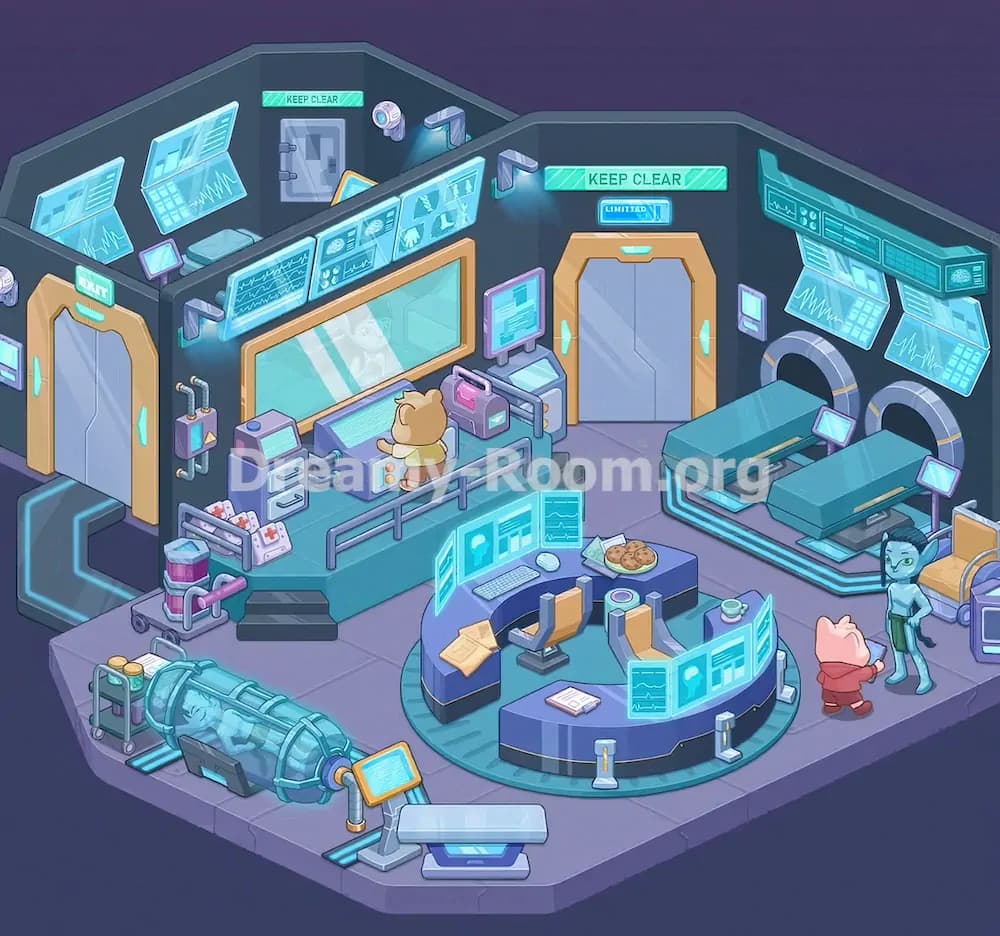
Start Dreamy Room Level 659 by establishing the room’s architectural structure before touching any furniture or devices. The finished scene uses a dark, angular sci-fi shell with deep grey-blue walls and a lavender floor. Place the left wall first, then the back wall, then the right wall so the room forms a wide, beveled chamber. After that, install the tall gold-framed exit door on the far left wall. It should sit slightly forward, with a glowing green “EXIT” sign above it. Next, place the larger main door in the center of the back wall. This one also has a gold frame, a silver sliding center, a green “KEEP CLEAR” sign above, and a smaller blue label underneath. Finally, add the smaller service door in the rear-left corner behind the dividing wall, again with a green “KEEP CLEAR” sign. Dreamy Room Level 659 depends on getting these doors in the right order, because all other objects align around them.
Step 2. Add the dividing wall, observation window, and upper wall technology in Dreamy Room Level 659
Once the shell is in place, construct the central dividing wall that separates the rear-left section from the main lab floor. In Dreamy Room Level 659, this divider is crucial because it holds the large observation window and several display screens. The wide rectangular observation glass belongs on the front face of the divider, slightly left of center, framed in gold. Above that window, mount a row of long blue medical data screens stretching across the divider’s top edge. Then move to the left upper wall and place two floating blue monitor panels, both tilted slightly downward toward the room. On the right wall, add the large horizontal monitor cluster with two hanging screens beneath it. Finish the top layer by placing the wall-mounted light arms above the divider and along the right wall, each casting a cool blue glow. Dreamy Room Level 659 looks empty until these overhead elements are set, so treat them as the visual scaffold for the whole room.
Step 3. Install the raised workstation and control equipment in Dreamy Room Level 659
Now build the raised medical workstation on the left-center side of Dreamy Room Level 659. Begin with the elevated teal platform directly in front of the observation window. Add the short black steps at the front so characters can reach the platform. Along the outer edge, place the simple railings that run across the front and right side of the platform. Against the platform’s back area, position the main glowing control console under the observation window. A small bear-like technician stands facing this machine, so leave space for that character in front of the screen. To the left of the console, place the compact purple drawer cabinet with two white drawers. To the right, place the pink equipment case on a small support unit. On the left wall beside the exit door, attach the boxy utility module with exposed pipes running around it. Finally, add the thick pipes connecting the console to nearby machines. In Dreamy Room Level 659, these pipes make the station feel functional, so missing even one connection makes the setup look wrong.
Step 4. Place the left-side medical supplies, trolley items, and emergency materials in Dreamy Room Level 659
With the platform complete, move to the cluttered support area on the left side of Dreamy Room Level 659. Start by placing the small wheeled supply cart near the front-left corner of the platform. It holds stacked containers and fits between the platform and the stasis area. Next, lean the two white cushions or packs marked with red crosses against the platform railing. These are easy to misplace, but they belong low and slightly left of the stairs. After that, put the tiny rolling cart with two green canisters at the far lower-left side of the room. This cart stands beside the large horizontal pod, not near the main desk. You should also add the small floor pads under the pod area and keep enough open space so the glass cylinder can dominate that corner. Dreamy Room Level 659 uses these minor medical props to connect the left side visually, so do not scatter them randomly. Their purpose is to bridge the platform, emergency gear, and cryo equipment into one believable treatment zone.
Step 5. Build the stasis pod and front information terminals in Dreamy Room Level 659
The large cryogenic or stasis pod is one of the most memorable objects in Dreamy Room Level 659, so place it carefully. It belongs diagonally across the lower-left floor, with its transparent body showing a sleeping blue figure inside. The left end sits closer to the canister trolley, while the right end points inward toward the center of the room. Add the dark support base beneath the pod and make sure the orange connector cap appears on the right end. After that, place the angled information stand with the orange frame just in front of the pod’s right side. This stand faces slightly toward the center, as though explaining the patient’s condition. Near the front middle edge of the room, add the broader freestanding terminal with a glowing lower screen and a large translucent panel above it. Dreamy Room Level 659 feels balanced only when these front devices frame the foreground, so keep them low, wide, and readable from the player’s perspective.
Step 6. Assemble the circular command desk and work items in Dreamy Room Level 659
Next, focus on the central command island, which is the heart of Dreamy Room Level 659. Place the circular teal floor base first, slightly right of center, leaving walking space on every side. On top of that base, build the curved blue control desk in a horseshoe shape opening toward the back-left. Inside the desk, add two orange-and-grey swivel chairs, one nearer the left curve and one nearer the right curve. Then place the floating holographic screens around the desk: one large transparent panel near the front, another wrapping along the outer curve, and a third rising near the left side. Add the keyboard and white mouse on the inner workstation surface. On the desk top, place the stack of yellow papers to the left, the plate of cookies near the upper middle, and the small green cup on the right. Finally, put the white document on the outer front floor edge and the short silver-and-gold posts around the base. Dreamy Room Level 659 relies on this desk to anchor the room, so its rotation and spacing must be exact.
Step 7. Set up the scanner beds and right-side treatment bay in Dreamy Room Level 659
The right half of Dreamy Room Level 659 is a clean, organized scanning area. Begin by placing the two large circular tunnel scanners into the right wall. They sit side by side, with the upper tunnel slightly farther back and the lower tunnel slightly closer to the viewer. Then slide a teal scanning bed into each tunnel so the beds extend leftward into the room. Each bed has a narrow yellow strip along its top surface, and both rest on glowing blue supports. At the foot of each bed, place a small purple monitor on a slim stand, angled toward whoever would operate the scanners. On the wall near the back door, add the two small rectangular purple control panels. Near the far-right edge, position the orange chair with blue side rails, and tuck the partial medical cart beside it. In Dreamy Room Level 659, this area should look orderly and clinical, so keep the two beds parallel and evenly spaced.
Step 8. Add the characters, signs, cameras, and final finishing details in Dreamy Room Level 659
Finish Dreamy Room Level 659 by placing the living and decorative details that make the room feel active. Put the blue alien-like patient or visitor near the lower-right floor, facing left toward the pink pig-like character in a red outfit. The pig stands closer to the center, slightly in front of the command desk, as if approaching or speaking to the blue figure. Return to the rear-left corner and add the small security camera or sensor near the ceiling, pointing into the room. Check that every glowing sign is present: “EXIT” above the left door, “KEEP CLEAR” above the rear-left service door, and another “KEEP CLEAR” above the large central back door with the smaller blue label beneath it. Make sure every wall monitor is tilted correctly and every lamp shines downward into the work zones. Dreamy Room Level 659 is solved when the room looks busy but not crowded, with every object supporting the medical-lab story.
Notes and Precautions for Dreamy Room Level 659
Dreamy Room Level 659 can be deceptive because many objects are futuristic rectangles in similar blue and purple tones. The most common mistake is confusing the central command desk screens with the wall-mounted screens. The floating holographic panels belong around the circular desk, while the solid glowing monitors belong high on the walls and divider. Another frequent error is putting the stasis pod too close to the command desk. It should stay clearly in the lower-left treatment zone with its own canister trolley and information stand.
Pay attention to height and layering in Dreamy Room Level 659. Several objects overlap: the platform sits above floor level, the rails sit on the platform edge, the observation window sits in the divider wall, and the long screens sit above that window. The scanning beds also must align with the circular wall tunnels, not float in front of them. If something looks slightly off, the issue is usually angle or depth rather than the wrong object.
Tips and Tricks from top player for Dreamy Room Level 659
In Dreamy Room Level 659, place the biggest structural pieces first and work from back to front. Start with walls, doors, divider, and scanners; then add the platform and desk; then finish with props, papers, carts, and characters. This prevents small items from confusing your sense of space. A good top-player habit is to divide the room into three zones: left treatment zone, center command zone, and right scan zone. Once you think in zones, each item becomes easier to identify.
Another strong trick for Dreamy Room Level 659 is to match objects by function. Medical cushions with red crosses stay near the platform and treatment side. Holographic data belongs near workstations. Patient-facing devices stay by the pod or scanner beds. Also use the signs as anchors. Once the left EXIT door and central KEEP CLEAR door are locked into place, the rest of the room naturally lines up around them. When stuck, zoom out mentally and ask which side of the room the object supports.
Final look of Dreamy Room Level 659
When Dreamy Room Level 659 is complete, the room becomes a polished sci-fi medical lab filled with story and purpose. The left side shows a busy observation and treatment station with a raised platform, console, drawers, emergency packs, carts, and a large stasis pod holding a sleeping figure. The center is dominated by a curved command desk surrounded by glowing holographic panels, chairs, papers, cookies, and a cup, making the space feel lived in rather than sterile. On the right, two scanner beds slide neatly into wall tunnels, supported by small monitors and control panels. Above everything, glowing screens, lamps, cameras, and warning signs create a believable high-tech atmosphere. The final charm of Dreamy Room Level 659 comes from the two small characters near the right side and the bear technician at the console, proving that the stage’s real challenge is understanding exactly where every meaningful object belongs.