Dreamy Room Level 527
Dreamy Room Level 527 guide - Dreamy Room 527 Walkthrough & Solution.
Important Notice Regarding Level Numbering
Due to frequent changes in Dreamy Room's level numbering and differences between platforms (Android/iOS) – for example, level 527 on Android might not be the same as level 527 on iOS – the text guide below may not always match the images and video above. Please prioritize the image and video guides. If you find that the guide content doesn't match your current level, please visit the All Level Walkthroughs page to find the correct guide based on level images. Thank you for your understanding.
Dreamy Room Level 527 Walkthroughs & Guide
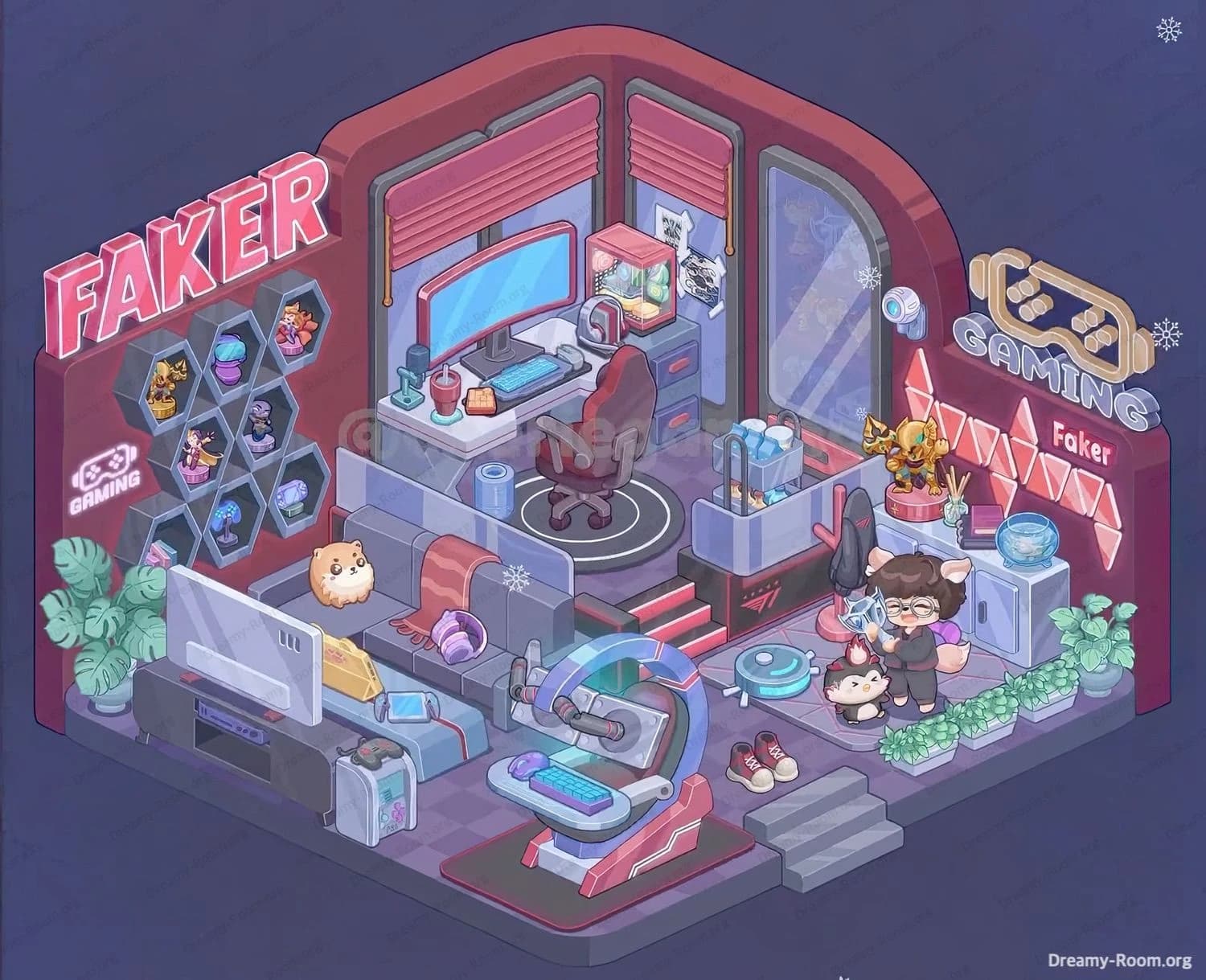
In Dreamy Room Level 527, the whole challenge is figuring out the exact correct placement for every object—especially the neon wall pieces and the layered gaming setup. Use the empty room as your compass: you’re building a two-level gamer lounge with a raised stage, branded décor, and tons of small collectibles. Follow this Dreamy Room Level 527 walkthrough step by step to transform the bare platform into the finished “FAKER” gaming room scene.
Step 1. Place the raised stage platform and center stairs in the middle-back area.
In Dreamy Room Level 527, start by locking in the room’s most important structure: the raised stage platform. Position the rectangular platform on the back half of the floor so it sits centered against the back wall. The platform edge should face forward, and the stairs must be placed in the middle of that front edge, leading from the lower floor up to the stage. Make sure the steps align perfectly so the red-highlighted stair stripes face outward toward you. This foundation controls where the desk zone goes later, so in Dreamy Room Level 527, don’t rotate it incorrectly—if the stairs end up on the wrong side, many later objects won’t “click” into place. Confirm the platform’s darker trim and red glowing accents match the finished image orientation.
Step 2. Install the curved red wall shell and the arched back-wall shape behind the stage.
Next in Dreamy Room Level 527, build the room’s signature architecture: the deep red curved wall shell. Place the large wall piece so it wraps around the back and left sides, with the tall rounded arch centered on the back wall. The arch should rise above the stage area and create the “spotlight” feeling over the gaming desk zone. This wall placement is crucial in Dreamy Room Level 527 because all neon signage and window frames attach to it. Pay attention to the curvature: the right side should extend toward the front-right corner, leaving space for the right cabinet and neon “GAMING” wall later. If the wall seems to fit but looks slightly off, rotate and re-seat it—Dreamy Room Level 527 often tests precision with these large background pieces.
Step 3. Place the window frames and pink blinds on the back corner and right wall.
In Dreamy Room Level 527, the windows define the upper-stage vibe. Place the two back-corner windows so they meet at the corner behind the desk area—one window on the left portion of the back wall and the other on the right portion of the back wall. Then add the pink roller blinds to each back window, ensuring the blind slats and pull cords sit neatly inside the frames. After that, install the tall right-side window panel on the right wall; it should be the largest glass piece and show the snowy atmosphere outside. This right window is important in Dreamy Room Level 527 because it sets the correct height for the wall camera and the neon signage that goes near it later. If the blinds appear mirrored, flip them—alignment matters here.
Step 4. Mount the left-side “FAKER” neon sign and the small controller “GAMING” emblem on the left wall.
Now in Dreamy Room Level 527, start branding the room. Place the large FAKER neon lettering high on the left wall, near the top edge, angled to match the room’s isometric perspective. Beneath it (still on the left wall), mount the smaller white controller icon with the word GAMING under it. These two pieces must sit on the left wall section, not on the back wall—Dreamy Room Level 527 loves to trick players because both walls look similar in color. The larger neon sign should feel dominant and readable from the front-left angle, while the small emblem sits lower and closer to the honeycomb display area you’ll install next. Confirm the glow faces outward and isn’t hidden behind shelves.
Step 5. Place the hexagon honeycomb wall shelves and fill them with the small collectibles.
In Dreamy Room Level 527, the honeycomb shelf cluster goes mid-left wall under the “FAKER” sign. Seat the multi-hex frame so it looks like a connected set of hex cells. Then place each collectible into an individual hex slot: a gold trophy-like figure, a purple-blue jar/potion container, small character figurines (including a mage-like figure and other tiny heroes), a blue mushroom-style lamp, a purple crystal/rock piece, and a small stack of pastel boxes/books in the lower hex. The key in Dreamy Room Level 527 is that each mini item has a specific hex nook—if one won’t snap, it likely belongs in a different cell. Use the finished image to match which items sit higher versus lower.
Step 6. Build the upper-stage desk setup with the monitor, peripherals, and the gaming chair on the circular mat.
This is the heart of Dreamy Room Level 527. Place the white desk on top of the stage, pushed back toward the corner windows. The desk faces forward, with the wide curved monitor centered on the tabletop. Add the blue keyboard and mouse in front of the screen, then place the teal microphone on the left side of the desk. Add the red drink cup with straw near the middle-left, and put the small orange snack/waffle-like item near the keyboard area. Place the red gaming chair on the circular rug/mat (dark with white rings) centered in front of the desk so it looks ready for play. In Dreamy Room Level 527, if the chair mat is missing, the chair may refuse to lock—layering matters.
Step 7. Add the drawer cabinet, display cube, headphones, posters, and the drink crate near the stage edge.
Continue Dreamy Room Level 527 by placing the blue drawer cabinet to the right of the desk (still on the stage). On top of it, position the cube display case with a pink cap and colorful contents inside, then set the over-ear headphones near the cabinet top (leaning/placed close to the display). Attach the two small posters/printouts on the back wall near the right window area behind the desk zone. Finally, place the open bin/crate filled with blue bottles and snacks at the right edge of the stage, near the stair landing/rail area. In Dreamy Room Level 527, this crate helps “bridge” the upper stage to the right-side décor. If it clips strangely, it usually means the crate belongs right at the stage corner.
Step 8. Place the couch area, throw blanket, plush, and the lounge accessories on the lower-left floor.
In Dreamy Room Level 527, the lower-left becomes a cozy lounge. Place the blue couch facing toward the TV area, positioned left of the stage stairs. Drape the reddish blanket across the couch so it hangs over the seat edge. Add the round tan plush (dog/hamster-like) sitting on the couch, and place the purple headphones on the couch cushion as shown. Next, set the blue rectangular bench/ottoman in front of the couch; it has a red strap detail across it. Put the smartphone on top of that bench and add the yellow triangular bag/pouch beside it. This step matters in Dreamy Room Level 527 because the lounge props are small and easy to misplace—if something won’t snap, check whether it belongs on the couch vs. the bench.
Step 9. Install the TV, media console, and gaming gear in front of the couch.
Now Dreamy Room Level 527 shifts to the entertainment wall. Place the large white TV/monitor on the black media console so it faces the couch. The console should sit on the lower-left floor area, aligned so the TV screen points toward the seating zone. Add the console’s internal device (the purple unit inside the shelf) if it appears as a separate piece. Then place the small white case/tower-like unit (with handle) near the front-left area by the lounge—position it where it matches the finished image, close to the bench and TV zone. Place at least one game controller on or near this unit as shown. In Dreamy Room Level 527, the TV angle is critical: if it faces the wrong direction, the room’s flow looks broken even if items “fit.”
Step 10. Set the futuristic gaming pod on the center-bottom floor and place the robot vacuum nearby.
In Dreamy Room Level 527, the center floor is dominated by the futuristic gaming pod (a curved-frame chair station). Place the red-and-blue pod on the black mat with a red outline, centered toward the front-middle of the room. Ensure the curved frame arches upward and the seat faces slightly toward the left lounge/TV direction. Add the small keyboard and mouse on the pod’s tray area (blue keyboard and purple mouse). Then place the blue/teal robot vacuum on the floor to the right of the pod, near the character area. This is a classic Dreamy Room Level 527 “snap test”: the pod must be perfectly seated on its mat, or the accessories and nearby floor objects won’t align cleanly.
Step 11. Decorate the right wall with neon “GAMING,” triangle panels, the “Faker” label, and set the right-side cabinet display.
In Dreamy Room Level 527, the right side is all about layered wall décor. Mount the large controller-shaped neon with the word GAMING on the upper-right wall. Below it, attach the glowing triangle-panel wall section, and add the “Faker” name label so it sits neatly across that panel area. Next, place the light-blue cabinet against the right wall. On top of the cabinet, place the gold armored figure/statue on a round red pedestal, then set the reed diffuser (sticks in a small bottle) and the purple book beside it. Finally, place the fishbowl filled with blue water on the cabinet’s right side. This step is vital in Dreamy Room Level 527 because multiple items compete for the same surface—each has a precise spot.
Step 12. Add the wall camera, guitar stand area, character figures, floor shoes, and greenery to finish the scene.
Finish Dreamy Room Level 527 by placing the small wall camera on the right wall near the big window. Then set the dark guitar (or guitar-like standing décor) on its stand near the character zone, along with the pink arrow-shaped sign behind/near it as shown. Place the chibi character with glasses and animal ears/tail on the lower-right floor area, posed hugging the blue star-like item. Put the small penguin plush beside them. Add the red sneakers pair on the floor near the front-right steps. Finally, line the front edge with the rectangular planter boxes filled with leafy green plants, and place the potted plant at the far right corner. In Dreamy Room Level 527, greenery often “completes” the collision boundaries—if a plant won’t place, something nearby is slightly off.
Notes and Precautions
- In Dreamy Room Level 527, place big structural pieces first (stage, walls, windows). Many small objects won’t snap until the correct base layer exists.
- Neon signage in Dreamy Room Level 527 is wall-specific: “FAKER” belongs on the left wall, while the controller “GAMING” and triangle panels belong on the right wall.
- The desk zone in Dreamy Room Level 527 is sensitive to orientation. If the chair mat or chair won’t place, the desk may be rotated incorrectly.
- Surface clutter is a common trap in Dreamy Room Level 527: drinks, snacks, headphones, and books each have a single correct slot.
- Don’t ignore tiny décor cues (posters, diffuser sticks, pedestal placement). Dreamy Room Level 527 rewards careful matching to the final scene, not “close enough” placement.
Tips and Tricks from top player
- For Dreamy Room Level 527, use a “zones first” method: build upper stage, then left lounge, then right décor, then center pod. It prevents wandering placements.
- When stuck in Dreamy Room Level 527, hover items near likely surfaces: wall items will “grab” to walls; tabletop items will only snap to the correct desk/cabinet.
- In Dreamy Room Level 527, neon and posters are easiest if you align them visually with nearby edges (window frames and wall curves).
- Place the largest props (TV, couch, cabinet, pod) before chasing small collectibles—Dreamy Room Level 527 often hides the correct snap points behind big furniture.
- If two small items look interchangeable, they aren’t. Dreamy Room Level 527 usually differentiates by tiny offsets (left vs. right side of a cabinet top, front vs. back of a shelf).
Final Scene Overview of Dreamy Room Level 527
The completed Dreamy Room Level 527 room becomes a vibrant esports-themed lounge built around a glowing “FAKER” identity. A raised stage at the back holds the main workstation: a sleek desk with a wide monitor, bright peripherals, a microphone, snacks, and a red gaming chair framed by snowy corner windows and pink blinds. The left wall showcases a honeycomb shelf packed with collectibles beneath bold neon lettering, while the lower floor turns cozy with a couch, plush, blanket, and a TV setup for relaxing between matches. On the right, the neon “GAMING” wall, triangle light panels, and a curated cabinet display (statue, diffuser, book, fishbowl) create a trophy-corner vibe. Dreamy Room Level 527 finishes with a futuristic gaming pod, robot vacuum, character figures, shoes, and lush greenery that ties the whole scene together.