Dreamy Room Level 767
Dreamy Room Level 767 guide - Dreamy Room 767 Walkthrough & Solution.
Important Notice Regarding Level Numbering
Due to frequent changes in Dreamy Room's level numbering and differences between platforms (Android/iOS) – for example, level 767 on Android might not be the same as level 767 on iOS – the text guide below may not always match the images and video above. Please prioritize the image and video guides. If you find that the guide content doesn't match your current level, please visit the All Level Walkthroughs page to find the correct guide based on level images. Thank you for your understanding.
Dreamy Room Level 767 Walkthroughs & Guide
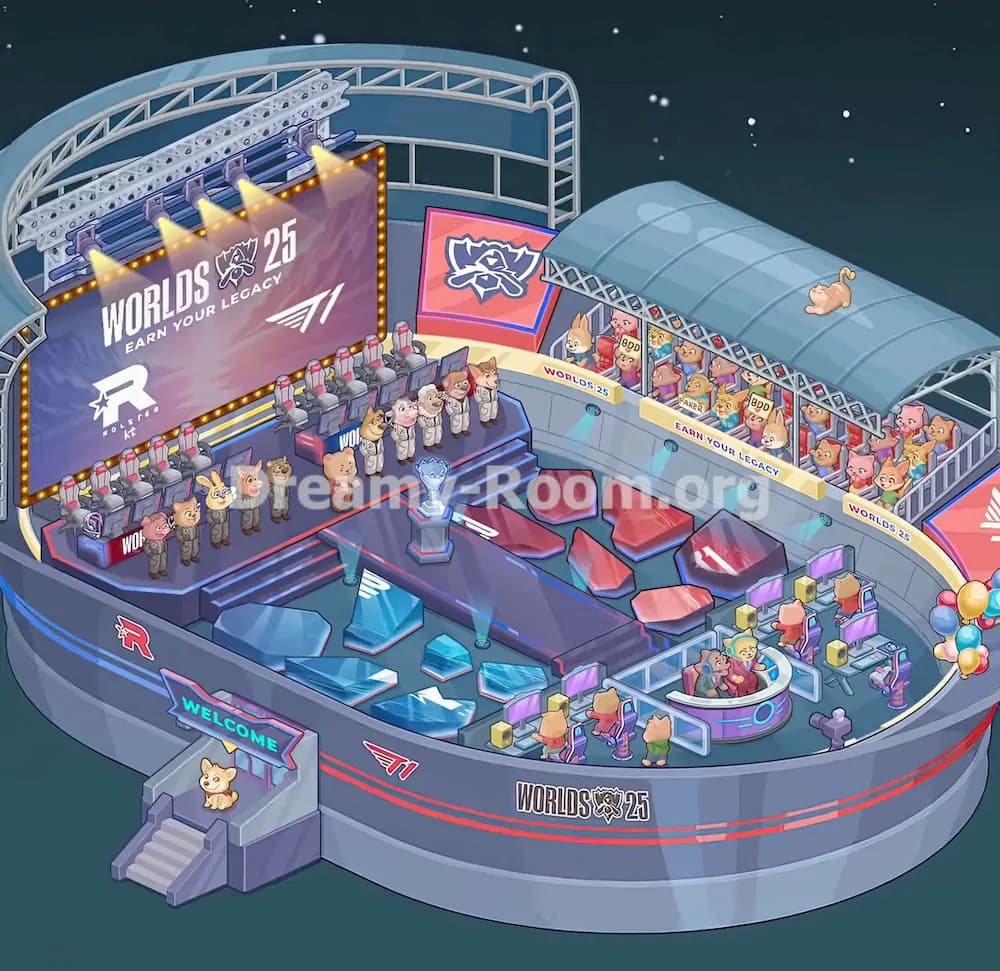
Dreamy Room Level 767 turns an empty futuristic arena into a full esports championship venue. The main challenge in Dreamy Room Level 767 is not finding objects, but determining the exact placement for each object: stage items, audience pieces, broadcast gear, team members, lighting, trophies, signs, and decorative details all need to lock into very specific positions.
Step 1. Place the main championship stage on the left side of the arena.
Begin Dreamy Room Level 767 by building the main competition area on the left half of the oval arena floor. Place the large raised stage against the back-left curved wall, directly beneath the existing upper truss structure. The stage should sit slightly above the main floor, with dark blue edging, red accents, and a stepped front section facing toward the center of the arena. This is the anchor object for Dreamy Room Level 767, because many later objects depend on its position: the player desks, the giant screen, the team line-up, and the central catwalk all connect to this stage. Make sure the stage does not float too far forward. Its rear edge should align closely with the curved wall, while its front steps should point toward the middle trophy platform.
Step 2. Place the giant Worlds 25 screen and overhead lighting rig behind the stage.
Next in Dreamy Room Level 767, install the huge vertical event screen at the back-left side of the stage. It should show the large “WORLDS 25” text, the “Earn Your Legacy” slogan, the star-shaped team logo, the winged T1-style logo, and the “Rostar” branding near the lower-left area. Place the screen directly behind the player seating area, framed by small golden marquee lights along its edges. Above it, position the long silver lighting truss with blue bars and several warm spotlights shining downward. In Dreamy Room Level 767, this object can feel slightly oversized, but it belongs high and back, not in the center. The lights should cast their glow over the stage and player chairs, creating the championship atmosphere.
Step 3. Place the player computers, gaming chairs, and team stations on the left platform.
Now add the competition setup in Dreamy Room Level 767. Place the row of gaming stations across the rear and left side of the raised stage, directly in front of the giant screen. Each station includes a red-and-gray gaming chair, monitor, desk base, and small equipment details. The chairs should face toward the front-right direction, as if the players are competing on stage while the audience watches from the right side. Keep the stations tightly aligned in a neat row; Dreamy Room Level 767 uses this arrangement to show a professional esports final, not a casual gaming room. The leftmost stations sit close to the “WOR” marking on the stage front, while the rest continue toward the middle behind the team characters. Avoid placing chairs on the central walkway, because that area is reserved for the trophy and presentation zone.
Step 4. Place the animal players and team members on the stage steps.
After the gaming stations are fixed, Dreamy Room Level 767 needs the characters placed carefully. Put the first group of animal players in darker uniforms along the front-left stage edge, standing in a line near the player desks. This group includes several cute animal competitors, such as dog, rabbit, cat, and bear-like figures, all facing toward the center. Then place the second group in white team uniforms across the higher middle steps, just in front of the chairs and slightly to the right of the first team. These white-uniform characters should form a clean presentation line facing forward. Dreamy Room Level 767 depends on this spacing: the characters should look like two esports teams standing for a ceremony. A small pink mascot-like figure belongs near the lower middle-left side of the steps, beside the stage line.
Step 5. Place the central walkway, trophy pedestal, and presentation lights.
The middle of Dreamy Room Level 767 is dominated by the long dark purple runway extending from the stage toward the front-center floor. Place this catwalk so it connects naturally with the stage steps and points toward the arena’s lower front wall. At the upper-middle part of the runway, place the silver-blue trophy on its dark pedestal. The trophy should sit almost exactly in the center of the walkway, slightly closer to the stage than to the broadcast area. Add the small spotlight fixtures near the front-left and front-right sides of the catwalk, with blue beams shining upward across the arena floor. In Dreamy Room Level 767, the trophy is a key visual object, so do not hide it behind characters or monitors. It should be visible from the front and framed by the runway.
Step 6. Place the red and blue crystalline floor panels around the central arena.
Once the main stage is built, fill the open floor of Dreamy Room Level 767 with the angular glass-like panels. On the left side of the central walkway, place the larger blue panels near the lower-left floor area, including one large tilted panel, one medium panel, and several smaller broken geometric pieces. These blue panels should sit between the front entrance and the trophy runway. On the right side of the walkway, place the red panels in a similar scattered pattern, with several larger red shards near the right-middle floor and smaller ones near the runway edge. Dreamy Room Level 767 uses these red and blue pieces to balance both teams visually. Keep them flat on the arena floor and leave the runway itself clear, so the central trophy path remains readable.
Step 7. Place the right-side audience stand, roof canopy, and crowd.
Move to the upper-right side of Dreamy Room Level 767 and place the covered spectator section along the curved wall. The light blue arched canopy should sit above the bleachers, attached beneath the existing truss and following the curve of the arena. Under the canopy, place the packed audience of colorful animal fans: cats, dogs, rabbits, bears, and other small creatures fill the tiered seats. Some fans hold signs, including “BPD” and “FAKER,” while others simply face the stage. Place the yellow rail signs along the front of the stand: “WORLDS 25” on the left, “EARN YOUR LEGACY” in the middle, and another “WORLDS 25” on the right. In Dreamy Room Level 767, the crowd must face left toward the stage, not outward toward the viewer.
Step 8. Place the small cat on the roof and the right-side wall lighting.
Dreamy Room Level 767 includes small decorative objects that are easy to miss. Place the orange sleeping cat on top of the blue audience canopy, near the upper-right portion of the roof. The cat should lie horizontally and face toward the right side, adding a playful touch above the crowded seats. Then place the small blue wall lights under the yellow audience rail signs. These lights should be spaced along the curved inner wall below the “WORLDS 25” and “EARN YOUR LEGACY” signage, pointing downward toward the arena floor. These details matter in Dreamy Room Level 767 because they make the stadium feel finished instead of empty. Do not place the cat inside the stands; it belongs on the roof, clearly visible against the smooth blue canopy.
Step 9. Place the team-logo screen on the upper-right inner wall.
Next, position the rectangular pink-orange team-logo display on the inner upper-right wall of Dreamy Room Level 767. It belongs to the left of the covered audience stand and slightly behind the central stage area, angled toward the viewer. The screen shows a bold raccoon-like emblem on a red and pink gradient background with a blue frame. This object should sit above the wall railing and behind the line of white-uniform characters, helping connect the stage side to the crowd side. In Dreamy Room Level 767, this screen should not overlap the large Worlds 25 screen on the left. Think of it as a secondary arena display, placed between the main stage and spectator section. Align it so the logo faces forward and can be seen from the lower front of the arena.
Step 10. Place the broadcast desks, monitors, and seated commentators on the lower-right floor.
The lower-right side of Dreamy Room Level 767 is the broadcast and production zone. Place the small desks with monitors, purple chairs, yellow speaker-like blocks, and control panels along the right inner curve of the arena floor. Several animal staff members sit at these stations facing the screens. Arrange them in two rows: one closer to the right wall and one closer to the central arena floor. Beside them, place the rounded analyst desk with two seated animal hosts inside; this desk has a pale blue and purple rim with a glowing circular design on the front. Dreamy Room Level 767 requires this broadcast area to stay separate from the main stage, so keep it on the lower-right side and do not mix it with the player chairs. The small equipment table with controls belongs nearby.
Step 11. Place the cameras, small props, balloons, and front-right decorations.
Add the final small props to the right-front side of Dreamy Room Level 767. Place the purple camera or microphone stand near the lower-right inner floor, slightly in front of the analyst desk and facing toward the stage. Add the cluster of balloons outside the right curve of the arena, tied near the front-right edge. The balloons include red, white, blue, and golden colors, and they should float beside the stadium wall rather than inside the seating area. There is also a small red screen or sign edge visible near the far-right wall, which should align with the arena’s curved boundary. Dreamy Room Level 767 uses these small objects to complete the event setting, so check that none of them blocks the broadcast desks or the audience rail signs.
Step 12. Place the front entrance stairs, welcome sign, mascot dog, and exterior logos.
Finish Dreamy Room Level 767 by decorating the lower-left entrance and exterior wall. Place the stair block outside the front-left side of the arena, with steps leading upward into the venue. Above the entrance, add the bright cyan “WELCOME” sign on a purple frame. Place the small sitting dog mascot on the entrance landing, centered under the sign and facing forward. Along the outer stadium wall, make sure the red and blue stripe decorations, the side team logos, the winged logo, and the large “WORLDS 25” emblem remain visible. In Dreamy Room Level 767, this entrance is not just decoration; it visually explains how guests enter the arena. Keep it attached to the outside of the oval wall, below the main stage area, not inside the competition floor.
Notes and Precautions
Dreamy Room Level 767 has many objects with similar colors, so the biggest mistake is placing esports items in the wrong functional zone. Player chairs and monitors belong only on the raised left stage, while broadcast monitors and commentator desks belong only on the lower-right floor. The audience must stay under the curved blue canopy on the upper-right side, and the orange cat must sit on top of that canopy. The trophy should remain centered on the dark runway, not pushed into the stage line or the broadcast area. In Dreamy Room Level 767, always use the curved stadium wall as your guide: stage items follow the back-left curve, crowd items follow the right curve, and entrance items attach outside the lower-left wall. Also watch the signs carefully. “WELCOME” belongs at the front entrance, while “WORLDS 25” and “EARN YOUR LEGACY” belong on the audience rail and screen displays.
Tips and Tricks from top player
For Dreamy Room Level 767, place the largest objects first: stage, giant screen, canopy, audience stand, central runway, and broadcast zone. These pieces create the map, making small items much easier to position later. A top-player method is to divide Dreamy Room Level 767 into four zones: left competition stage, center trophy runway, right audience stand, and lower-right media desk. Once you think in zones, the puzzle becomes much clearer. Another useful trick is to match object direction. Anything with a screen should face the viewer or the stage; anything with seated spectators should face toward the left-side competition area. Place signs last, because signs are good final alignment checks. If “WELCOME” is at the entrance, the team-logo screen is behind the stage, and the yellow audience banners curve along the right wall, your Dreamy Room Level 767 layout is almost certainly correct.
Final Scene Description
The completed Dreamy Room Level 767 scene becomes a glowing nighttime esports championship arena floating under a starry sky. On the left, a professional stage holds gaming stations, red-gray chairs, animal competitors, and a massive “WORLDS 25” screen lit by warm spotlights. In the center, a purple runway leads to a shining blue trophy, surrounded by red and blue crystalline floor panels that suggest rival teams and dramatic competition energy. On the upper-right side, a packed animal audience cheers from beneath a curved blue canopy, with banners reading “WORLDS 25” and “EARN YOUR LEGACY.” A tiny orange cat naps on the roof above the crowd. The lower-right area holds commentators, monitors, production desks, balloons, and camera equipment. At the front-left, a “WELCOME” entrance with stairs and a sitting dog mascot completes Dreamy Room Level 767 as a lively, polished championship venue.