Dreamy Room Level 660
Dreamy Room Level 660 guide - Dreamy Room 660 Walkthrough & Solution.
Important Notice Regarding Level Numbering
Due to frequent changes in Dreamy Room's level numbering and differences between platforms (Android/iOS) – for example, level 660 on Android might not be the same as level 660 on iOS – the text guide below may not always match the images and video above. Please prioritize the image and video guides. If you find that the guide content doesn't match your current level, please visit the All Level Walkthroughs page to find the correct guide based on level images. Thank you for your understanding.
Dreamy Room Level 660 Walkthroughs & Guide
Step 1. Place the controller and establish the lower-right foreground.
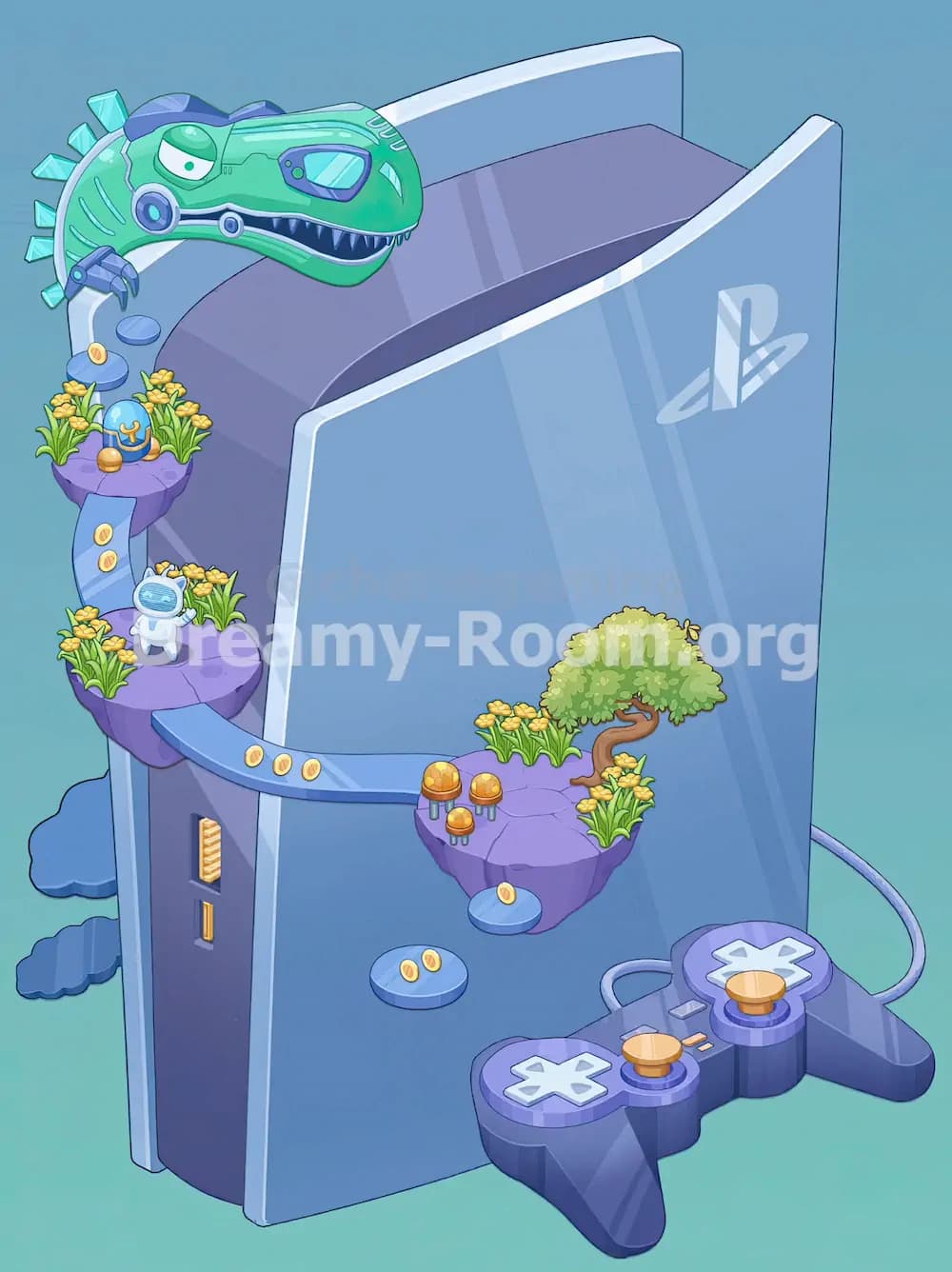
Start Dreamy Room Level 660 by anchoring the bottom-right area with the large purple game controller. This is one of the easiest objects to recognize because it sits directly in front of the console on the floor and extends slightly to the right. The controller should be angled horizontally across the lower-right foreground, with its cable curving backward and looping around the right side of the console. Make sure the cord does not float too high or cross awkwardly over the front panel. The controller itself includes two pale directional-pad shapes, two gold thumbsticks, and tiny gold switch details in the center, so it should feel like a substantial base object rather than a small decoration. Once this is in place, add the PlayStation logo onto the glossy front panel of the console, centered on the right half. This gives the scene its identity and helps you judge the spacing for the floating platforms that will later sit in front of the console face.
Step 2. Build the floating path on the left side and connect it to the center.
The next priority in Dreamy Room Level 660 is the floating route on the left side of the console. Place the two purple rock platforms along the left edge, one above the other. The upper platform should sit near the top-left side of the console, just below the dinosaur’s future position, while the lower platform belongs midway down the left side. Between them, add the short blue stair-like connector with gold coin details, making sure it runs downward from the upper platform to the lower one. Then place the longer curved blue bridge extending from the lower-left platform toward the middle-right area. This bridge arcs gently across the front of the console and must line up with the island that will be placed later on the right. Add the gold coin markers on the bridge surface and on the small blue stepping stones near the left side. These path pieces are crucial because Dreamy Room Level 660 uses them to visually guide the eye from the dinosaur area down toward the center decorations.
Step 3. Place the center-right island with the bonsai tree, flowers, and mushrooms.
Now move to the focal island on the right side, which is the prettiest decorative cluster in Dreamy Room Level 660. Set the purple floating island slightly right of center, in front of the console’s glossy panel and above the controller. It should connect naturally to the long blue bridge from the left. Once the island is positioned, place the small curved bonsai tree toward the right side of the island, with its trunk leaning gently and its rounded green canopy spreading over the top. Add the yellow flower clumps around the edges of the island, especially near the bonsai and toward the front corners. Then place the three orange-gold mushroom lamps or mushrooms on the left side of this island in a compact cluster. Under the island, add the small blue stepping stone with a single coin, and below that place the lower blue circular stepping stone with two coins in the center foreground. These small pieces matter because this level rewards exact placement, and the right island in Dreamy Room Level 660 looks incomplete unless every tiny accent is balanced correctly.
Step 4. Decorate the upper-left platform with flowers, stepping stones, and the blue ornament.
With the structural islands in place, return to the upper-left section of Dreamy Room Level 660 and dress it properly. On the upper purple platform, place several yellow flower patches around the outer edges so the platform feels lush rather than bare. In the middle of that platform, set the small blue decorative ornament or egg-like object with its gold stand and gold marking on the front. It belongs near the center-front of the platform, not pressed against the back wall. Above and slightly left of this platform, arrange the small round blue stepping stones in a vertical path leading upward. One of them carries a coin, so keep the coin visible and facing forward. This whole upper-left cluster should feel like a tiny elevated garden beneath the future dinosaur head. Be careful not to crowd the flowers too tightly around the ornament, because the scene in Dreamy Room Level 660 keeps a clean balance between greenery and open surface area. If the platform looks overfilled, something is probably misaligned.
Step 5. Finish the lower-left platform with the astronaut cat and surrounding details.
The lower-left floating island is where Dreamy Room Level 660 adds charm through character placement. Put the small white astronaut-cat figure on the lower-left purple platform, facing outward toward the viewer. The figure has a blue-tinted helmet visor and stands slightly left of center on the platform. Around it, place the yellow flower clusters so they frame the character without hiding it. This platform should connect visually upward to the short blue stair path and outward to the long blue bridge that crosses the scene. On the side face of the console itself, make sure the gold vent-like grille and the small gold vertical port detail are visible on the left panel, because those details help the console read correctly as the room’s main structure. Also keep the blue cloud-like shapes tucked behind the left side near the base; they act as soft background accents. In Dreamy Room Level 660, small figures often reveal the intended center of a platform, so once the astronaut cat feels naturally showcased, you are very close to the correct arrangement.
Step 6. Add the robotic dinosaur head across the top and complete the final balance.
The final major object in Dreamy Room Level 660 is the green robotic dinosaur head resting across the top-left edge of the console. Position it so the head leans in from the upper-left corner, with its snout extending across the top front edge of the console. The purple crest along the top of the head should remain visible, and the mechanical eye piece, metal jaw ring, and small robotic arm detail should face toward the front. Its teeth should angle downward over the console roof, making it look like the dinosaur is peering into the scene. Once this top piece is placed, do a full sweep of the level: confirm the front logo is centered on the right panel, the cable loops cleanly behind the console, the bridges align, the stepping stones sit beneath the floating route, and every coin and flower patch is visible. The reason Dreamy Room Level 660 can be tricky is that the top dinosaur changes the visual weight of the whole room, so the rest of the decorations must feel evenly balanced beneath it.
Notes and Precautions
While playing Dreamy Room Level 660, watch the spacing between objects more carefully than usual. The floating platforms are not random decorations; they create a clear left-to-right journey through the scene. If one platform is too high, too low, or too far forward, the bridges and stepping stones will look disconnected. Another common mistake is placing the bonsai island too close to the controller, which makes the foreground feel cramped. The robotic dinosaur should sit on top of the console, not float behind it. The astronaut cat must remain visible on the lower-left platform, and the blue ornament belongs on the upper-left platform, not the right island. Keep all coin markers facing outward where possible, and do not bury the yellow flowers behind larger objects. This level is won by respecting exact placement and visual flow, not by dropping items roughly into the correct quadrant.
Tips and Tricks from top player
Top players approach Dreamy Room Level 660 by dividing the room into three layers: base structure, floating route, and decorative finish. First, lock in the controller, logo, and major islands. Second, connect everything with bridges, stairs, and stepping stones. Third, add the flowers, coins, cat figure, blue ornament, mushrooms, bonsai, and dinosaur. Another good trick is to use character items as anchors: the astronaut cat marks the lower-left platform, the blue ornament marks the upper-left platform, and the bonsai defines the right island. If you are unsure where a coin goes, look for empty blue stepping stones or bridge surfaces with obvious spacing. Also, step back mentally and check the silhouette of the room. The dinosaur gives the top-left strong visual weight, so the right island and bottom-right controller must counterbalance it. When the whole scene feels symmetrical in weight, even if not in shape, you usually have the correct solution.
Final Scene Description
The finished view of Dreamy Room Level 660 turns a plain PlayStation-style console into a playful fantasy display. A glossy front panel with the PlayStation logo faces forward, while a purple controller with gold sticks rests at the lower right, its cable looping behind the console. Floating across the front are purple stone platforms connected by blue walkways and stepping stones marked with gold coins. On the lower-left island stands a tiny white astronaut cat surrounded by yellow flowers. Above it, another flower-filled platform holds a small blue ornament. At the center-right, a bonsai tree grows beside a cluster of mushroom-like decorations and more flowers. Blue cloud shapes sit softly behind the left side of the console, and the entire composition is crowned by a large green robotic dinosaur head stretching over the top-left edge. The final scene feels futuristic, cozy, and whimsical at the same time.