Dreamy Room Level 509
Dreamy Room Level 509 guide - Dreamy Room 509 Walkthrough & Solution.
Important Notice Regarding Level Numbering
Due to frequent changes in Dreamy Room's level numbering and differences between platforms (Android/iOS) – for example, level 509 on Android might not be the same as level 509 on iOS – the text guide below may not always match the images and video above. Please prioritize the image and video guides. If you find that the guide content doesn't match your current level, please visit the All Level Walkthroughs page to find the correct guide based on level images. Thank you for your understanding.
Dreamy Room Level 509 Walkthroughs & Guide
Step 1. Place the central CHICK processing machine against the back wall
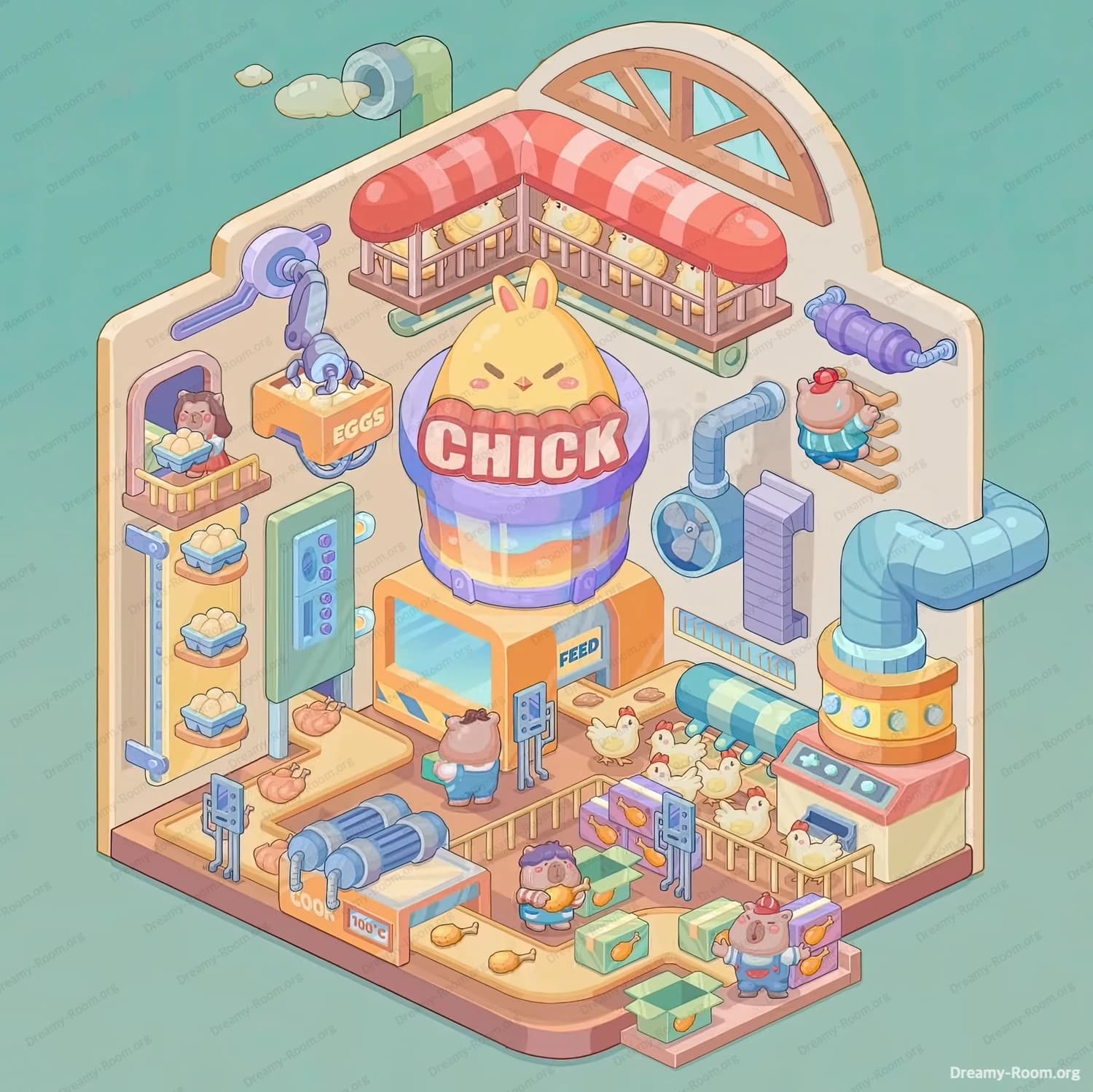
Begin Dreamy Room Level 509 by anchoring the entire scene with the largest and most important object: the CHICK processing machine. Position this tall, rounded machine exactly in the center of the back wall, where the two walls meet. The purple-and-yellow cylindrical top with the bold “CHICK” label must face forward, while its orange base sits firmly on the wooden floor. This object defines the visual hierarchy of Dreamy Room Level 509, so placing it first is critical.
Attach the orange lower module labeled FEED directly beneath the CHICK container. Make sure its small control panel faces the room, not the wall. This placement establishes the vertical workflow of the factory, visually explaining how feed enters the system from below and eggs emerge above. In Dreamy Room Level 509, this step is essential because almost every other object connects visually or logically to this core machine. If this placement is off-center or rotated incorrectly, later conveyor belts and pipes will not align properly, making the room feel cluttered instead of organized.
Step 2. Install the egg storage racks and left-side machinery
Move to the left wall of Dreamy Room Level 509 and begin building the egg-handling area. Place the tall vertical rack with multiple trays of eggs directly against the left wall, near the front edge of the room. The trays should stack upward evenly, showing neat rows of pale yellow eggs. This rack visually balances the height of the CHICK machine and introduces the production theme clearly.
Next, add the mechanical arm above the egg rack. The arm should extend outward from the left wall, angled slightly toward the center of the room, as if it is transferring eggs into the system. Below it, place the orange box clearly labeled EGGS, aligning it so the arm appears to drop eggs into the container. Finally, install the blue control panel near the rack, facing forward. In Dreamy Room Level 509, this left-side setup tells the story of egg collection, so precise alignment is important to avoid visual confusion.
Step 3. Build the conveyor belt and cooking section on the lower left
Continue Dreamy Room Level 509 by focusing on the lower-left floor area. Place the long conveyor belt running horizontally from left toward the center of the room. On this belt, position cooked chicken pieces so they appear to be moving forward. Directly behind the belt, add the two cylindrical metal cooking machines, aligned parallel to the wall. These machines should look heavy and industrial, reinforcing the factory atmosphere.
Near the conveyor, attach the temperature indicator marked 100°C, making sure it faces the player. This small detail adds realism and reinforces the idea of active processing. Add a small worker character nearby, positioned as if monitoring the belt. In Dreamy Room Level 509, this section adds motion and energy, so spacing matters. Avoid pushing the conveyor too close to the wall or the central machine, as it needs breathing room to read clearly as a functional production line.
Step 4. Arrange the chicken pen, pipes, and right-side systems
Shift your attention to the right side of Dreamy Room Level 509. Place the fenced chicken pen in the lower-right corner of the room. The fence should face forward, with several chickens gathered inside. Make sure the pen sits slightly away from the wall so the chickens remain fully visible. Above the pen, install the large blue ventilation fan on the wall, centered vertically between floor and ceiling.
Next, connect the blue and yellow pipe system. Attach the thick curved pipe emerging from the floor on the far right, connecting it upward toward the CHICK machine. Add the smaller horizontal pipes and vents so they visually link the right wall machinery to the central processor. Place the feed chute above the chicken pen, aligning it so it appears to deliver feed downward. In Dreamy Room Level 509, these pipes visually unify the room, so every connection should feel intentional and continuous.
Step 5. Add workers, packaging crates, and upper decorations
Now bring Dreamy Room Level 509 to life by adding characters and finishing details. Place one worker near the FEED control panel at the center, facing the machine as if operating it. Add another worker on the lower-right side holding a green crate, positioned near stacked boxes filled with chicken products. Place a third worker near the conveyor belt to suggest teamwork across the factory.
On the upper back wall, add the red-and-white striped awning and the long balcony filled with small chicks. This should sit above the CHICK machine, neatly centered. Add the arched window behind it to soften the industrial look. Finally, place the exhaust pipe on the top-left wall, releasing small puffs of steam. These decorative touches complete the storytelling of Dreamy Room Level 509, turning a mechanical setup into a lively, charming production scene.
Notes and Precautions
In Dreamy Room Level 509, object order is crucial. Always place large structural elements—like the CHICK machine, racks, and pens—before adding workers or small props. Rotating objects accidentally is a common mistake, especially pipes and control panels. Make sure labels like EGGS, FEED, and 100°C face forward. Avoid overlapping conveyor belts with characters, as this breaks visual clarity. Depth layering matters: wall-mounted items must sit flush against walls, while floor items should remain clearly separated. Taking your time prevents misplacement and ensures Dreamy Room Level 509 feels clean, readable, and satisfying.
Tips and Tricks from Top Player
Top players recommend approaching Dreamy Room Level 509 from the back wall forward. Establish the story first—eggs enter, chickens feed, products exit—then place objects to support that flow. Use symmetry as a guide, but don’t force perfect balance; slight asymmetry adds charm. Save progress before placing workers so you can reposition them for better storytelling. If something looks crowded, it probably is—spacing is key in Dreamy Room Level 509. Finally, trust visual logic: if an object looks like it belongs somewhere, that’s usually the correct placement.
Final Scene Description
The completed Dreamy Room Level 509 reveals a cheerful, bustling chicken factory filled with warmth and personality. At the center, the glowing CHICK machine anchors the scene, surrounded by humming conveyors, steaming pipes, and neatly stacked egg racks. Chickens peck happily in their pen while tiny chicks rest above under a striped awning. Workers move with purpose, crates are packed neatly, and every machine feels connected. The pastel colors soften the industrial theme, creating a cozy balance between function and charm. Dreamy Room Level 509 transforms an empty space into a playful, story-rich environment where every object feels perfectly placed.