Dreamy Room Level 679
Dreamy Room Level 679 guide - Dreamy Room 679 Walkthrough & Solution.
Important Notice Regarding Level Numbering
Due to frequent changes in Dreamy Room's level numbering and differences between platforms (Android/iOS) – for example, level 679 on Android might not be the same as level 679 on iOS – the text guide below may not always match the images and video above. Please prioritize the image and video guides. If you find that the guide content doesn't match your current level, please visit the All Level Walkthroughs page to find the correct guide based on level images. Thank you for your understanding.
Dreamy Room Level 679 Walkthroughs & Guide
Step 1. Place the main floating platforms and forest base in the center.
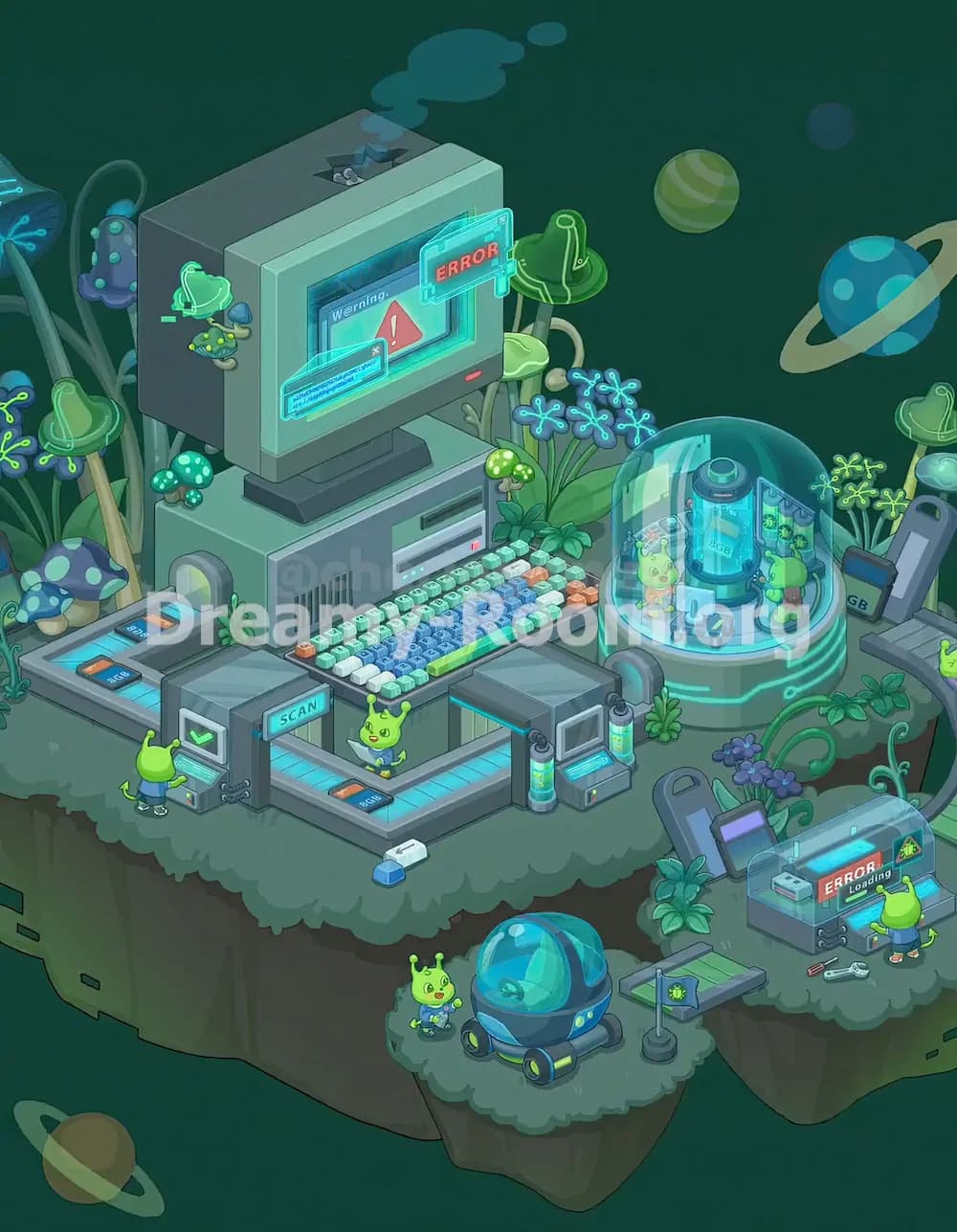
Start Dreamy Room Level 679 by reading the empty scene as a multi-platform alien forest lab. The large leafy cliff platform should become the main work area, occupying the left and center of the scene. Keep its broad mossy surface open because the giant computer, keyboard, conveyor, scanners, mushrooms, and plants will all depend on this foundation. The smaller rounded platform belongs at the lower center, slightly separated from the main island, while the right-side platform should sit lower and farther to the right. In Dreamy Room Level 679, the main challenge is judging these layered heights: the left platform feels like the command deck, the lower platform becomes a vehicle bay, and the right platform becomes the repair station. Make sure the platforms remain surrounded by dark green space so the floating sci-fi atmosphere stays visible.
Step 2. Place the giant CRT computer on the upper-left main platform.
The largest object in Dreamy Room Level 679 is the old-fashioned CRT computer, so place it first after the base. Position the monitor on the upper-left portion of the main island, angled slightly toward the viewer. The bulky screen should sit above a gray computer tower base, with the screen showing a warning panel and red triangle alert. Add the small hatch detail on top of the monitor, where tiny parts or creatures peek out, and place the blue smoke puff drifting upward from the top. In front of the screen, attach the translucent blue holographic panel and the red “ERROR” sign, both floating across the monitor’s face. In Dreamy Room Level 679, this computer anchors the whole room, so do not push it too far right; it must leave space for the dome laboratory on the middle-right side.
Step 3. Place the keyboard and computer base equipment below the monitor.
Below the CRT monitor in Dreamy Room Level 679, place the wide gray computer base directly on the main platform. It should line up beneath the screen, with the vented front panel on the left and a disk-drive slot on the right. In front of this base, place the long colorful keyboard. The keyboard should stretch horizontally across the center of the main island, with pale keys on the left and right, blue keys in the center, small orange keys scattered near the edges, and a bright green spacebar at the front. This keyboard is important because it visually connects the computer with the alien workers. In Dreamy Room Level 679, avoid placing the keyboard too low; it should sit just above the front conveyor path, leaving enough room for the central alien character and the scan lanes.
Step 4. Place the left scan conveyor, scanner gate, and front alien worker.
Now build the front-left scanning area of Dreamy Room Level 679. Place the rectangular conveyor platform along the lower-left edge of the main island, with glowing cyan panels and small orange display panels embedded in the belt. The conveyor should run toward the central scanner gate. Add the gray scanner machine near the front-left center, with its green check screen facing outward and the word “SCAN” visible on the top sign. A small green alien worker stands in front of this machine, facing it from the lower-left side, as if checking the scan result. Behind and around this scanner, place a few small plants and cables. In Dreamy Room Level 679, this area can be tricky because the scanner must overlap the belt without hiding the alien’s head or the checkmark screen.
Step 5. Place the central conveyor path and small alien in front of the keyboard.
Continue Dreamy Room Level 679 by extending the conveyor path across the front-middle of the main platform. The belt should turn from the left scanner area toward the center, then continue toward the right-side machine. Keep the glowing cyan panels visible, with orange number panels placed at the corners. Put the cheerful green alien in the center-front area, just below the keyboard and slightly above the conveyor corner. This alien faces forward, wearing a blue outfit, and helps show the scale of the huge computer. Place a small white-and-blue capsule-like object on the ground below the conveyor near the front edge. In Dreamy Room Level 679, the central alien should not touch the keyboard; leave a narrow visual gap so the room still looks organized rather than crowded.
Step 6. Place the right-side scanner gate, cylinders, and small terminal.
On the lower-right side of the main platform in Dreamy Room Level 679, place the second scanner unit where the conveyor path exits. This gray scanning arch should stand near the edge between the main island and the right-side area. Add the two glowing cyan cylinders vertically on the sides of the machine, and place the small screen panel on the front-right face. The top of this scanner looks like a dark flat roof, so keep it slightly below the keyboard line and to the right of the central alien. Add small plants around its base to blend the technology with the forest platform. In Dreamy Room Level 679, this scanner is easy to misplace because it must connect visually with the conveyor while also leaving room for the larger glass dome lab behind it.
Step 7. Place the glass dome laboratory on the middle-right platform area.
The glowing glass dome is one of the most important decorations in Dreamy Room Level 679. Place it on the middle-right side of the main island, slightly behind the right scanner gate and to the right of the keyboard. The circular base should be gray-green with bright cyan glowing stripes, while the transparent dome rises over a blue capsule tank in the center. Inside the dome, place the small alien on the left and the wheeled stool or tiny equipment near the front. Another alien stands to the right inside the dome, facing the central tank. Add the curved wall panel with green details behind them. In Dreamy Room Level 679, the dome must sit high enough to appear behind the scanner, but not so high that it collides with the floating planets in the background.
Step 8. Add mushrooms, alien plants, glowing flowers, and left-side decorations.
After the big machines are placed, fill the forest edges of Dreamy Room Level 679 with organic details. On the far left, place tall blue-green stems, glowing branching flowers, and several large mushroom caps, including the spotted blue mushroom near the lower-left edge and green saucer-shaped mushrooms behind it. Add smaller teal mushrooms near the computer base and bright dotted mushrooms beside the keyboard. On the upper-right side of the main island, place more glowing blue flower clusters and leafy plants around the dome. A small hanging alien ornament or tiny UFO-like device should attach near the left side of the CRT monitor, with a little creature beneath it. In Dreamy Room Level 679, these decorations frame the machines and prevent the scene from looking like plain technology instead of a hidden alien garden.
Step 9. Place the lower vehicle platform with rover, alien, flag, and plant.
Move to the small lower-center floating platform in Dreamy Room Level 679. Place the blue bubble rover in the center-right of this small island. It has a rounded transparent cyan cockpit, dark blue body, and small wheels with green highlights. Put the smiling green alien to the left of the rover, standing on the mossy ground and facing forward. Near the right edge of this lower platform, place the small flagpole with a gray flag showing a green bug or alien emblem. Add a leafy plant close to the bridge area above the platform. This section of Dreamy Room Level 679 acts like a parking bay or field station, so the rover should not be squeezed against the cliff edge. Keep it centered enough that the bubble cockpit remains fully visible.
Step 10. Place the right repair station, error scanner, tools, and alien technician.
The lower-right platform in Dreamy Room Level 679 becomes a repair and loading station. Place the rectangular machine with the transparent cover near the front-right edge. Its screen should show “ERROR” and “Loading,” with a warning triangle panel at the far right. Put the green alien technician in front of this console, facing the machine, as if trying to fix the error. Place the loose tools on the ground to the left of the alien: the wrench and red-handled screwdriver should lie diagonally near the platform edge. Behind the machine, add the gray upright terminal with a purple screen, the black cable, the leafy plant, and the small green object on the far-right side. In Dreamy Room Level 679, this station must feel separate from the main computer area but still connected by the mossy path and plants.
Step 11. Place the background planets, space details, and final atmospheric elements.
Finish Dreamy Room Level 679 by adding the background space decorations. Place the blue ringed planet on the upper-right side, slightly behind the dome laboratory. Add the green striped planet near the upper center-right and the small bluish planet above it. A larger muted ringed planet belongs in the lower-left background, partly outside the main platform area. These planets should float in the dark green space, not on the platform surface. Add the final glow effects to the computer screen, holographic error panels, dome, conveyor belts, scanner cylinders, flowers, and rover cockpit. In Dreamy Room Level 679, these atmospheric elements make the room feel complete, but they should never cover important gameplay objects. The final puzzle is about balancing depth: machines in front, plants around them, planets behind them.
Notes and Precautions
In Dreamy Room Level 679, the biggest thing to watch is object layering. The CRT monitor must sit behind the keyboard, while the keyboard must sit behind the central conveyor and alien. The glass dome should overlap some plants but should not cover the right scanner gate completely. The lower-right repair station must remain on its own platform, not on the main island. Pay attention to tiny visual clues: the “SCAN” label belongs on the front-left machine, the “ERROR” sign floats on the big monitor, and the second “ERROR Loading” display belongs on the right repair console. Dreamy Room Level 679 also includes many small aliens, and each one has a purpose. Do not swap them randomly; the left alien scans, the center alien stands by the keyboard, the dome aliens observe the tank, the lower alien stands near the rover, and the right alien repairs the error station.
Tips and Tricks from top player
For Dreamy Room Level 679, place the largest objects first: platform layout, CRT monitor, computer base, keyboard, dome, and scanner machines. Once those anchors are correct, the smaller decorations become much easier to fit. A top-player strategy is to follow the visual story from left to right: scanning begins on the left conveyor, data moves to the central computer, testing happens inside the dome, and broken items are handled at the right repair station. Another useful Dreamy Room Level 679 trick is to group objects by glow color. Cyan glowing belts, cylinders, screens, dome glass, and rover parts usually belong near technology, while green mushrooms and leafy plants belong along platform edges. Save the planets for last because they are background elements and should not interfere with exact object placement.
Final Scene Description
The completed Dreamy Room Level 679 scene becomes a floating alien research lab hidden inside a soft green forest canopy. On the main platform, a huge retro computer displays warnings and holographic error messages while a colorful keyboard and scan conveyor create a busy control center. Tiny green aliens operate scanners, inspect the keyboard area, and work inside a glowing glass dome where a blue capsule tank stands at the center. Around the machinery, dotted mushrooms, curling stems, neon flowers, and leafy plants make the laboratory feel alive. Below, a small platform holds a bubble rover, flag, alien worker, and plant, while the right platform shows a repair station with tools and another error screen. Dreamy Room Level 679 ends as a cozy sci-fi scene where every object has a precise place, and the main satisfaction comes from solving that exact placement puzzle.