Dreamy Room Level 726
Dreamy Room Level 726 guide - Dreamy Room 726 Walkthrough & Solution.
Important Notice Regarding Level Numbering
Due to frequent changes in Dreamy Room's level numbering and differences between platforms (Android/iOS) – for example, level 726 on Android might not be the same as level 726 on iOS – the text guide below may not always match the images and video above. Please prioritize the image and video guides. If you find that the guide content doesn't match your current level, please visit the All Level Walkthroughs page to find the correct guide based on level images. Thank you for your understanding.
Dreamy Room Level 726 Walkthroughs & Guide
Step 1. Place the large retro console body on the center-left base.
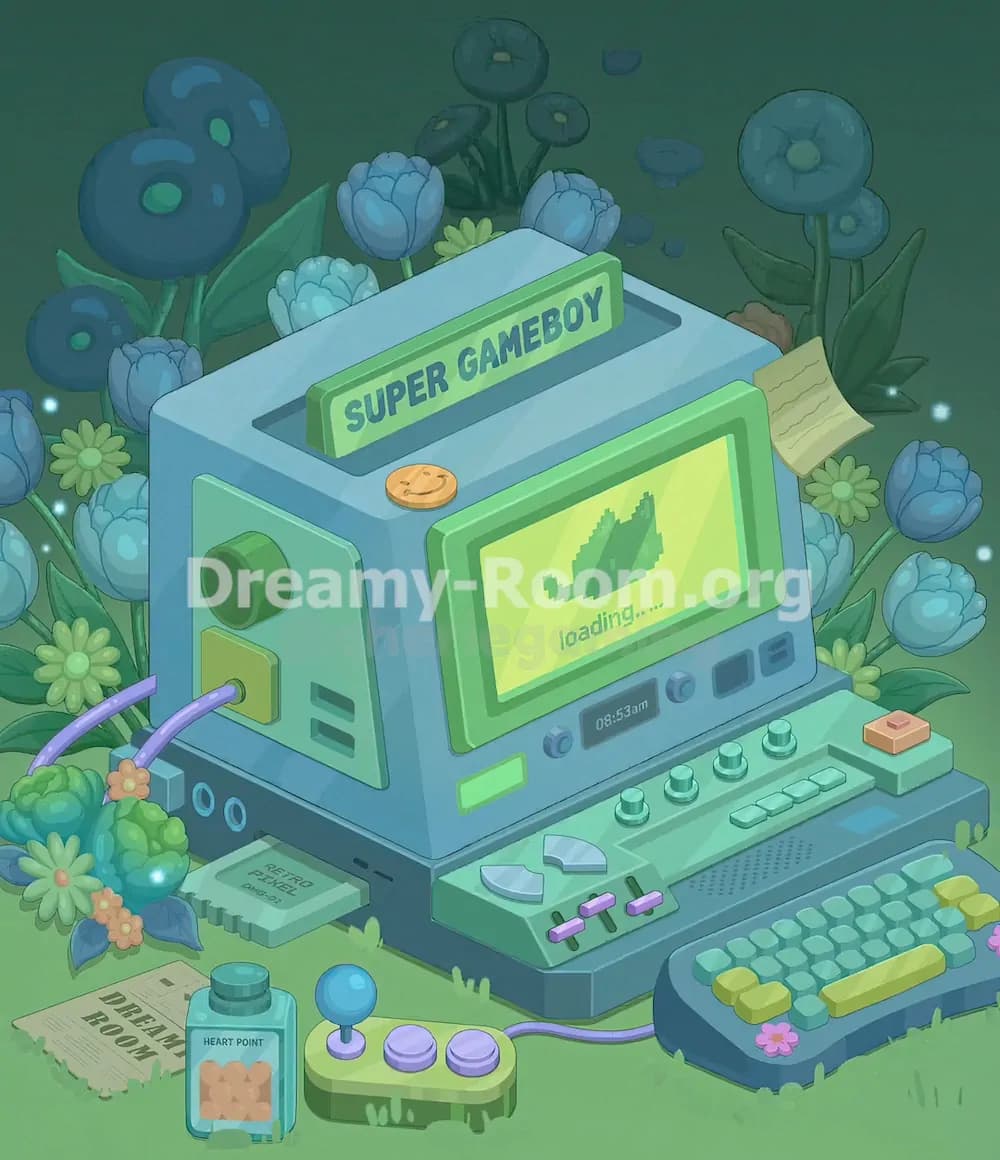
Start Dreamy Room Level 726 by placing the large blue console body directly on the raised platform, slightly left of center. This is the anchor object for the whole room, so it must sit firmly on the blue base and cover most of the original empty wall-and-floor area. The front face should point toward the lower-right side of the screen, while the left side panel remains visible on the left. In Dreamy Room Level 726, this blocky console replaces the empty yellow room shell, so check that its top edge aligns with the platform’s back edge. The lower front of the machine should rest just above the darker base strip. Correct placement here is essential because every later object, including the screen, sign, cables, controls, and flowers, depends on the console body being positioned accurately.
Step 2. Add the top slot and the “SUPER GAMEBOY” sign.
Next in Dreamy Room Level 726, place the long dark rectangular slot into the top surface of the console. It should run horizontally across the roof area, slightly behind the main front screen. After the slot is in place, insert the bright green sign marked “SUPER GAMEBOY” into the slot. The sign should stand upright and lean visually with the same perspective as the machine, with the text facing the viewer. In Dreamy Room Level 726, this sign is one of the easiest landmarks to use because it confirms the console’s theme and scale. Make sure the sign is not too far forward; it belongs near the back of the top surface. Behind it, leave enough visual room for the blue tulip-like flowers that rise from the garden background.
Step 3. Install the main front screen and loading display.
For the next part of Dreamy Room Level 726, place the large green-framed screen on the front face of the console, slightly right of center. The screen should be rectangular, with a thick green border and a yellow-green display inside. Inside the display, add the pixel-style leaf icon and the small “loading…..” text beneath it. This screen is the focal point of Dreamy Room Level 726, so avoid placing it too low or too far left. It should sit above the row of small front controls and below the top sign. The screen’s perspective must match the console face, slanting slightly toward the right. If this screen is misplaced, the rest of the controls will feel crowded, so use the front panel’s edges as your guide.
Step 4. Place the left side panel, round socket, square button, and vents.
Now work on the visible left side of the console in Dreamy Room Level 726. Add the pale green side panel onto the left wall of the machine. Near the upper-middle of this side panel, place the large round green socket or knob. It should protrude outward and face left. Beneath it, add the yellow-green square button with a small circular cable port in the center. To the lower-right of the square button, place the two narrow dark vent slits. Dreamy Room Level 726 relies heavily on these tiny mechanical details to make the device feel functional. The left panel must not overlap the front screen area, and the round socket should be high enough that the purple cables can connect naturally into the lower square port.
Step 5. Add the top coin button and the small sticky note.
In Dreamy Room Level 726, the console top includes two small but important decorations. First, place the round orange coin-like button on the upper front ledge, slightly left of the screen’s top edge. It should sit flat on the blue surface and look like a smiley coin or round token. Then place the yellow sticky note on the upper-right side of the console, attached near the edge beside the screen area. The note should tilt slightly and show faint writing lines. These pieces are easy to overlook, but Dreamy Room Level 726 uses them to create a lived-in, playful workstation feeling. The sticky note should not cover the screen; it belongs on the right outer side, near the surrounding flowers.
Step 6. Build the lower front control panel.
The next major task in Dreamy Room Level 726 is placing the long green control panel across the front of the machine. This panel should extend from the lower center toward the right, just beneath the main screen. Add the small glowing rectangular label on the left side of the panel, then place two blue knobs near the middle-left. Add the small dark display showing “08:53am” between the knobs and the right-side buttons. To the right of the time display, place the darker rectangular button and the two small stacked horizontal buttons. In Dreamy Room Level 726, these controls must line up neatly because they form the machine’s interface. Keep everything on the slanted front face, not on the floor, and make sure the panel follows the angle of the console.
Step 7. Arrange the sliders, directional pads, switches, and small buttons.
Continue Dreamy Room Level 726 by filling the lower control deck. Place the two pale silver directional-pad pieces on the left side of the green deck, just above the darker base line. Under them, add the three purple slider caps with slim black tracks, keeping them evenly spaced. Across the middle-right of the deck, place the four round green knobs in a neat row. To their right, add the small rectangular key cluster, arranged like short mint-green keys. On the far-right top corner of the deck, place the small peach button with a pink top. Dreamy Room Level 726 rewards precise spacing here. These objects are small, so avoid stacking them too closely; each should remain readable as part of the console’s gaming controls.
Step 8. Place the keyboard controller on the lower-right foreground.
For the lower-right area of Dreamy Room Level 726, place the separate dark blue keyboard controller on the grass in front of the console. It should sit diagonally, with its left side closer to the console and its right side extending toward the bottom-right corner. Fill it with rows of small teal keys, then add the larger yellow-green keys along the front and right side. A long yellow-green spacebar-like key should sit across the lower middle of the keyboard. Add the small pink flower decoration on the right front edge. In Dreamy Room Level 726, this keyboard must not touch the main console directly; it connects through the purple cable. Leave a small gap so the cable can curve naturally between the controller and the machine.
Step 9. Add the purple cables and the small joystick controller.
Now place the cables in Dreamy Room Level 726. Two purple cables should plug into the left side square port of the console and curve down toward the leafy bush on the lower-left side. Another purple cable should run from the main console area toward the small joystick controller in the foreground. Place the small green joystick controller near the bottom center, slightly left of the keyboard. It has a blue ball-topped joystick on the left and two purple round buttons on the right. The controller should face forward and sit on the grass. Dreamy Room Level 726 uses the cable shapes to connect the scattered gaming objects into one scene, so make sure the cables bend smoothly instead of cutting across the screen or floating away from their ports.
Step 10. Insert the “RETRO PUZZLE” cartridge into the front-left slot.
In Dreamy Room Level 726, a small cartridge appears partly inserted into the dark slot on the lower-left front of the base. Place the pale green cartridge so it sticks out horizontally from the console’s front-left slot. The visible label should read “RETRO PUZZLE,” with smaller text beneath it. The cartridge belongs below the left side panel and above the grass, tucked into the dark rectangular opening on the machine’s base. This is a key detail because Dreamy Room Level 726 is themed around a game console, and the cartridge explains what the machine is playing. Make sure it does not sit on the floor like a loose paper; it should look inserted into the device, with only part of the cartridge exposed.
Step 11. Place the foreground papers and Heart Point bottle.
Next, decorate the bottom-left foreground of Dreamy Room Level 726. Place the torn newspaper or instruction sheet on the grass at the lower-left corner, angled slightly. The visible text should read “DREAM ROOM.” Just to its right, place the small blue bottle labeled “HEART POINT.” The bottle should stand upright with a darker teal cap and a peach-colored label featuring small heart shapes. In Dreamy Room Level 726, these items create the feeling of a cozy game setup surrounded by notes and supplies. Keep the paper flat on the grass and the bottle vertical. The joystick controller should remain to the right of the bottle, while the inserted cartridge stays behind them near the console slot.
Step 12. Build the left garden cluster with bushes, daisies, and flowers.
Dreamy Room Level 726 surrounds the console with a soft fantasy garden. On the lower-left side, place the rounded green bush cluster beside the console’s left base. Add leafy blue-green foliage around it, then insert small orange-pink flowers and yellow daisy-like blossoms. A pale blue tulip should rise near the left edge, and another flower should sit behind the bush. This left garden cluster should partially frame the two purple cables without hiding their connection point. In Dreamy Room Level 726, flowers are not random filler; they mark the boundaries of the machine and help blend the gaming device into the dreamy outdoor background. Keep the cluster dense at the lower-left corner but avoid covering the “RETRO PUZZLE” cartridge or the visible side ports.
Step 13. Add the back-left and top flowers behind the console.
Now place the tall blue tulip-like flowers behind the console in Dreamy Room Level 726. Several rounded blue blossoms should appear above and behind the top surface, especially around the left rear and center rear. Add green leaves behind them so they rise from the grass instead of floating. A small yellow-green daisy should appear near the top center behind the “SUPER GAMEBOY” sign. These flowers should sit behind the console body, not on top of the screen. Dreamy Room Level 726 uses depth layering here: the flowers are background elements, while the sign and screen remain foreground objects. If a flower covers the text on the sign or blocks the top slot, move it backward until the console’s silhouette remains clear.
Step 14. Fill the right side with blue blossoms, leaves, and daisies.
For the right side of Dreamy Room Level 726, place the large leafy plant cluster behind and beside the console’s right edge. Add several blue tulip-like flowers around the sticky note and along the right background. Place yellow-green daisy blossoms between the blue flowers to break up the color. The flowers should frame the screen and keyboard without covering them. One blue flower sits near the upper-right background, while smaller blossoms and leaves fill the space around the console’s side. In Dreamy Room Level 726, the right-side flowers are important because they balance the dense left-side cable-and-bush area. Keep the tallest flowers behind the console and the shorter flowers closer to the front-right edge of the platform.
Step 15. Add final grass details, sparkles, and alignment checks.
Complete Dreamy Room Level 726 by checking every small detail around the base. Add the faint grass tufts near the bottom edge, small glowing blue sparkles around the left and right sides, and the tiny green drips or moss-like marks along the platform edges. Make sure the keyboard sits in the lower-right foreground, the joystick sits lower center, the bottle and paper sit lower-left, and the main console remains centered on the platform. Dreamy Room Level 726 is solved by correct placement, so review object overlaps carefully. The screen should stay readable, the “SUPER GAMEBOY” sign should be fully visible, the sticky note should remain on the upper-right side, and the purple cables should connect naturally between the console and controllers.
Notes and Precautions
Dreamy Room Level 726 has many small objects that can look correct at first glance but still be slightly misplaced. The biggest precaution is to build from the largest object to the smallest object. Place the console body before adding controls, flowers, or cables. In Dreamy Room Level 726, the main challenge is determining the correct placement for each object, especially because the scene uses layered depth: flowers go behind the console, controls go on the console, and papers or controllers go on the grass. Watch out for the sticky note, orange coin button, small sliders, cartridge, and “HEART POINT” bottle, because these are easy to miss. Do not cover the screen with flowers, and do not let the keyboard overlap the front control deck.
Tips and Tricks from top player
A strong strategy for Dreamy Room Level 726 is to use visual anchors. First anchor the console body, then the “SUPER GAMEBOY” sign, then the main loading screen. Once these three objects are correct, the rest of Dreamy Room Level 726 becomes much easier. Use the purple cables as connection guides: they show where the left side port, joystick controller, and keyboard area should be. Place background flowers only after the machine is complete, because otherwise you may accidentally hide important console details. Another useful trick is to group objects by surface. Controls belong on the front deck, the cartridge belongs in the slot, papers and controllers belong on the grass, and tall flowers belong behind the console. This prevents the common mistake of placing decorative items on the wrong layer.
Final Scene Description
The completed Dreamy Room Level 726 scene becomes a magical retro gaming garden. A large blue console sits proudly on the platform, with a bright “SUPER GAMEBOY” sign rising from the top slot and a glowing green loading screen on the front. The machine is covered with playful details: knobs, sliders, buttons, a time display, a sticky note, an orange coin button, and a “RETRO PUZZLE” cartridge inserted into the front. Purple cables connect the console to a small joystick controller and a chunky keyboard on the grass. Around the device, blue tulips, yellow daisies, leafy plants, bushes, sparkles, a “HEART POINT” bottle, and a “DREAM ROOM” paper create a soft fantasy atmosphere. Dreamy Room Level 726 feels like a forgotten handheld game system blooming back to life in a quiet enchanted meadow.