Dreamy Room Level 697
Dreamy Room Level 697 guide - Dreamy Room 697 Walkthrough & Solution.
Important Notice Regarding Level Numbering
Due to frequent changes in Dreamy Room's level numbering and differences between platforms (Android/iOS) – for example, level 697 on Android might not be the same as level 697 on iOS – the text guide below may not always match the images and video above. Please prioritize the image and video guides. If you find that the guide content doesn't match your current level, please visit the All Level Walkthroughs page to find the correct guide based on level images. Thank you for your understanding.
Dreamy Room Level 697 Walkthroughs & Guide
Step 1. Build the main broadcast structure in Dreamy Room Level 697.
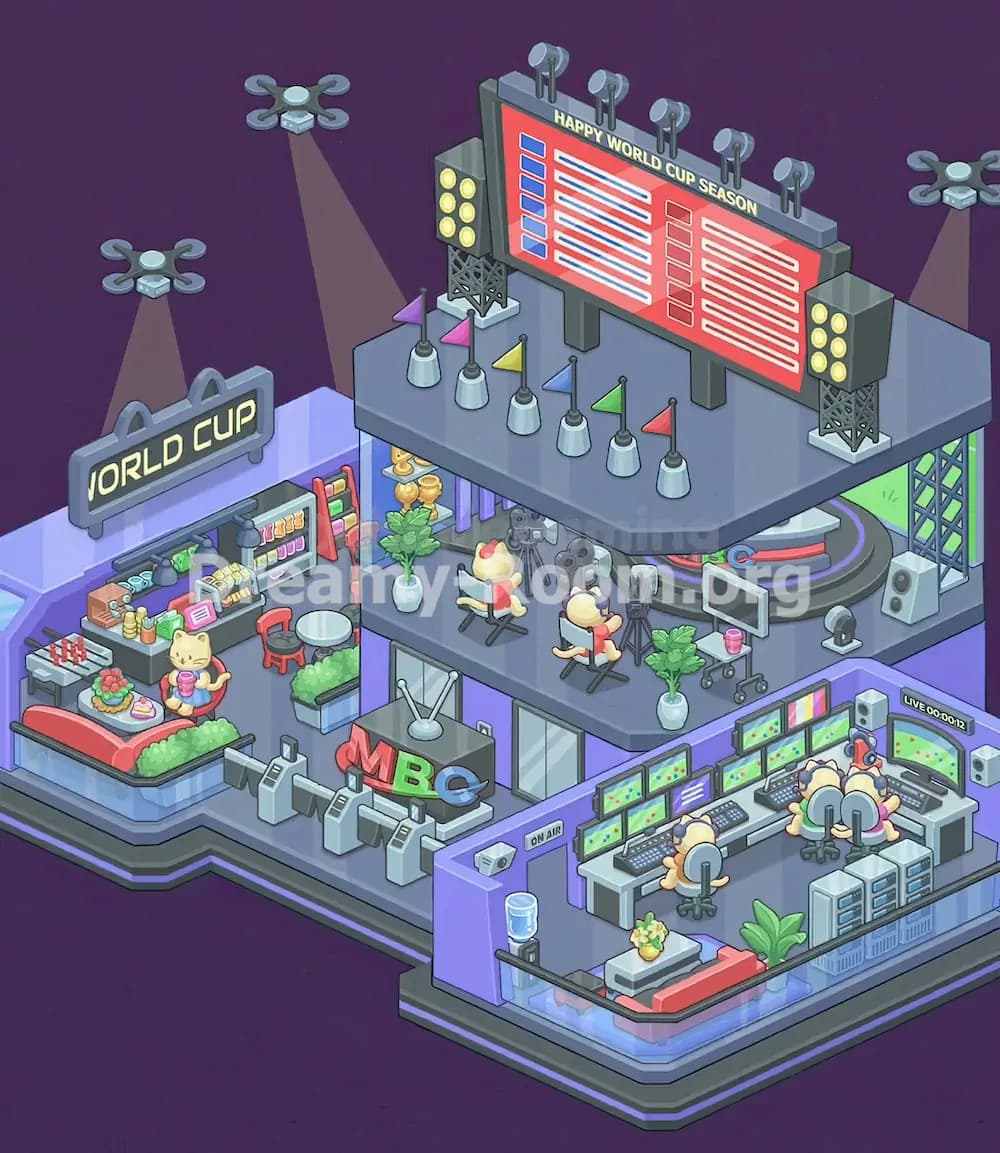
Start Dreamy Room Level 697 by treating the empty room as three connected zones: the left entertainment lounge, the central studio building, and the right control-room platform. The purple walls already show where the bigger pieces should anchor, so place the broad lower flooring first, keeping the raised right-side section aligned with the long front edge. Add the central second-floor platform above the middle area, leaving enough visible space beneath it for the entrance gates, glass doors, and MBC sign later. The top platform should sit slightly back from the front edge, because Dreamy Room Level 697 uses layered depth: the lower floor holds viewers and control staff, while the upper floor becomes the live studio. Once the platforms are aligned, add the glass railings along the front lower edges and the dark trim around the base.
Step 2. Place the left World Cup lounge and snack counter.
In Dreamy Room Level 697, the left side becomes a cozy viewing lounge with a concession-style snack area. Place the curved red sofa or bed along the front-left corner, with the green hedge-like cushion running behind it and around the side. Put the small food table on the sofa area, holding the colorful fruit plate, snacks, and tray. Next, set the cat character holding a pink drink near the center of this lounge, facing slightly forward. Behind the cat, place the long snack counter against the back-left wall. Add the colorful drink cans, bottles, food boxes, and cash-register-style items across the counter. The small gray game table with red-and-white pieces belongs at the far-left front, while the red chair and round white table sit near the middle-right of this lounge zone.
Step 3. Add the World Cup sign, lamps, fridge, and left decorations.
After the lounge base is complete, decorate the upper-left wall area of Dreamy Room Level 697 with the large “WORLD CUP” sign. It should sit above the snack counter, slightly tilted in the same isometric direction as the wall, with two rounded supports rising above it. Place the hanging black lamps under the sign so they shine down onto the counter. To the right of the counter, add the colorful refrigerator or display case filled with drinks and snacks; it should stand beside the red chair and near the round table. Add small stacked cups, jars, and snack containers across the shelf so the area looks crowded but readable. The challenge in Dreamy Room Level 697 is exact placement, so do not push the sign too far forward. It should visually connect to the left wall, while the snack display stays tucked underneath.
Step 4. Set up the entrance lobby and MBC broadcast desk.
The lower center of Dreamy Room Level 697 is the entrance and reception area for the broadcast station. Place the gray turnstile gates along the front-center edge, just below the central building. They should form a row leading into the studio, with the posts facing the viewer. Behind them, position the large MBC letter sign on the small dark-gray desk or booth. The red “M,” green “B,” and blue “C” should face the front-right direction, making the letters visible from the player’s view. Add the small satellite dish or antenna on top of the booth, angled upward. Behind this lobby, place the glass doors and window panels under the upper studio floor. In Dreamy Room Level 697, this area connects the public lounge on the left to the professional production room on the right.
Step 5. Arrange the lower-right control room in Dreamy Room Level 697.
The lower-right side is one of the busiest areas in Dreamy Room Level 697, so build it carefully. Place the long white control desks along the right wall, forming an L-shaped workstation. Add the many green soccer-field monitors across the desks and wall panels. The keyboards, mixer boards, and control panels should sit directly in front of the screens. Place the two seated staff characters in rolling chairs facing the monitors, with their backs toward the viewer. Add the larger right-side live monitor showing “LIVE 00:00:12” near the upper-right wall, flanked by white speakers. The small gray server cabinets belong at the front-right corner, while the wheeled office chairs must line up with the desks. Dreamy Room Level 697 depends on matching each tech object with its production-room function.
Step 6. Finish the control room with lounge, plant, water cooler, and On Air door.
Now complete the front and left edges of the control room in Dreamy Room Level 697. Place the purple “ON AIR” doorway on the left side of the control-room wall, just beneath the upper studio. Add the small security camera above or near this doorway, angled toward the room. The blue water cooler belongs in front of the purple wall, close to the lower-left corner of the control-room zone. Along the front edge, place the red-and-gray sofa, then add the low table with the small flower pot in front of it. Put the large green plant near the lower-right corner beside the sofa and cabinets. These softer items balance the technical screens and make Dreamy Room Level 697 feel like a working broadcast office rather than a plain computer room.
Step 7. Build the upper studio floor with cameras and seated hosts.
The second floor is the heart of Dreamy Room Level 697. Place the two director chairs on the upper platform, both facing toward the cameras and control side. Seat the cream-colored host characters in the chairs, making sure one is nearer the center and the other is slightly right. Add the two gray cameras on tripods in front of them: one large camera should face the central chair, while the second camera points toward the right-side chair. Place the extra monitor on a wheeled stand near the right edge of the upper floor, beside the green plant. This arrangement creates the feeling of an active sports broadcast. Dreamy Room Level 697 requires careful spacing here, because the chairs, cameras, tripods, and monitor can overlap if placed in the wrong order.
Step 8. Add trophies, plants, curtains, and studio props.
Once the camera setup is placed, enrich the upper platform of Dreamy Room Level 697 with the smaller studio details. On the back-left side of the upper floor, place the golden trophy display and the potted plant. The trophies should sit near the left support area, visible under the scoreboard zone. Add the vertical purple curtain-like panels behind this area to create a studio backdrop. Place another white pot with green leaves near the right-center edge of the upper floor, close to the monitor cart. Add any small black studio equipment, such as floor stands or audio gear, near the cameras and chairs. Dreamy Room Level 697 uses these props to tell the story of a World Cup season broadcast: the trophies represent victory, while the plants soften the metallic studio equipment.
Step 9. Place the curved sports stage on the upper-right side.
The upper-right corner of Dreamy Room Level 697 contains a curved sports presentation stage. Place the rounded gray platform with the red-and-blue ring against the right side of the upper floor. Behind it, add the green screen backdrop so it fills the right wall opening. The metal truss support should stand at the far-right side, rising from the platform toward the scoreboard area. Add the white speaker column near the lower side of this truss. Place the small microphone or headset stand and the red-and-blue equipment piece beside the curved stage, close to the monitor cart. In Dreamy Room Level 697, this stage should not block the seated hosts; it sits behind and to the right, acting as a separate presentation zone for match graphics or analysis.
Step 10. Install the giant Happy World Cup Season scoreboard.
The biggest object in Dreamy Room Level 697 is the red “HAPPY WORLD CUP SEASON” scoreboard. Place it across the top-center of the build, resting on thick gray supports behind the upper studio floor. The board should stretch horizontally above the hosts, with the title along the top and two columns of match-list graphics below. Add the gray frame around it, then attach the vertical support legs beneath. Place the yellow bulb light towers on both sides of the scoreboard: one tower on the left side above the trophy area and one on the right side above the stage. Each tower should stand on a metal lattice base. Dreamy Room Level 697 uses this huge scoreboard as the visual anchor, so align it before placing the small roof flags and spotlights.
Step 11. Add roof flags, spotlights, drones, and light beams.
With the scoreboard locked in place, decorate the top of Dreamy Room Level 697. Place the row of small colored flags along the front edge of the upper platform: purple, pink, yellow, blue, green, and red flags should stand in separate white bases. Add the row of circular spotlights across the top of the giant scoreboard, each mounted on a gray post. Next, place the flying drones around the scene. One drone hovers above the left lounge and projects a warm spotlight onto the “WORLD CUP” sign. Another drone floats higher near the upper-left area, casting light toward the central structure. A third drone hovers on the far upper-right, shining down near the stage. These flying lights make Dreamy Room Level 697 feel like a televised international event.
Step 12. Check the final alignment of every object in Dreamy Room Level 697.
Finish Dreamy Room Level 697 by checking all object relationships instead of only checking individual items. The left lounge should have the red sofa at the front, the food table on it, the cat character in front of the snack counter, the “WORLD CUP” sign above, and the fridge on the right side of the counter. The center should show turnstiles, glass doors, and the MBC sign beneath the upper studio. The lower-right control room should show desks, monitors, operators, live screen, speakers, sofa, plant, water cooler, and “ON AIR” doorway. The upper floor should hold hosts, cameras, tripods, trophy display, plants, monitor cart, curved stage, trusses, flags, and the giant scoreboard. In Dreamy Room Level 697, the puzzle is solved when every item supports the broadcast-studio story.
Notes and Precautions
Dreamy Room Level 697 has many objects with similar colors, so avoid placing items only by shape. The gray cameras, gray tripods, gray stage supports, gray scoreboard legs, and gray control desks can visually blend together. Work from large objects to small objects: floors first, furniture second, screens and signs third, then small props last. The main challenge in Dreamy Room Level 697 is determining the correct placement for each object, especially because the scene has three layers of depth.
Be careful with the upper studio. The seated hosts must face the cameras, not the scoreboard. The monitor cart belongs on the right side of the upper platform, while the large control-room monitors belong downstairs. The trophy display stays on the upper-left platform, not in the lounge. The “WORLD CUP” sign belongs over the snack counter, while the “HAPPY WORLD CUP SEASON” board belongs at the top center. Dreamy Room Level 697 also uses glass railings and wall openings as placement clues, so align items with those borders.
Tips and Tricks from top player
A strong strategy for Dreamy Room Level 697 is to divide the scene into four functional groups: fan lounge, entrance lobby, production control room, and live studio. Place all objects from one group before moving to the next. This prevents confusing lounge monitors with broadcast monitors or mixing upper-floor studio props with lower-floor office equipment.
Another useful trick in Dreamy Room Level 697 is to use text signs as anchors. Start with “WORLD CUP” on the left, “MBC” in the lower center, “ON AIR” near the control room, and “HAPPY WORLD CUP SEASON” on the top scoreboard. Once these text objects are correct, nearby items become easier to place. For example, snacks and the cat character go near “WORLD CUP,” turnstiles go near “MBC,” operators and screens go near “ON AIR,” and flags plus lights go under the scoreboard. Finally, place drones last because they float outside the room and should not interfere with furniture alignment.
Final Scene Description
The completed Dreamy Room Level 697 scene becomes a lively World Cup broadcast headquarters. On the left, a cheerful fan lounge includes a red sofa, green cushions, snacks, a cat viewer, a drink counter, a fridge, and a glowing “WORLD CUP” sign under drone lights. The lower center forms a studio entrance with turnstiles, glass doors, and bold MBC letters. On the right, the production control room is packed with operators, monitors, keyboards, speakers, a live timer screen, server cabinets, a sofa, plants, a water cooler, and an “ON AIR” door. Above everything, the second-floor studio holds hosts in director chairs, cameras, trophies, plants, a curved sports stage, colored flags, light towers, and a huge red “HAPPY WORLD CUP SEASON” scoreboard. Dreamy Room Level 697 feels busy, celebratory, and perfectly arranged.